
Orders and fulfillment
Shopify Orders Column Reference
Published by Profitonium Apps · Last updated
This reference covers all 204 visible Orders export controls in EditEngine: 51 Base, 13 Customer, 40 Addresses and Browser Details, 6 Company, 31 Line Items, 13 Line Items Product Data, 8 Refunds, 30 Transactions and Risk, 11 Fulfillments, and 1 Metafields control. ID and Name are selected by default. The tax and metafield controls expand into several spreadsheet headers, so a file can contain more than 204 columns.
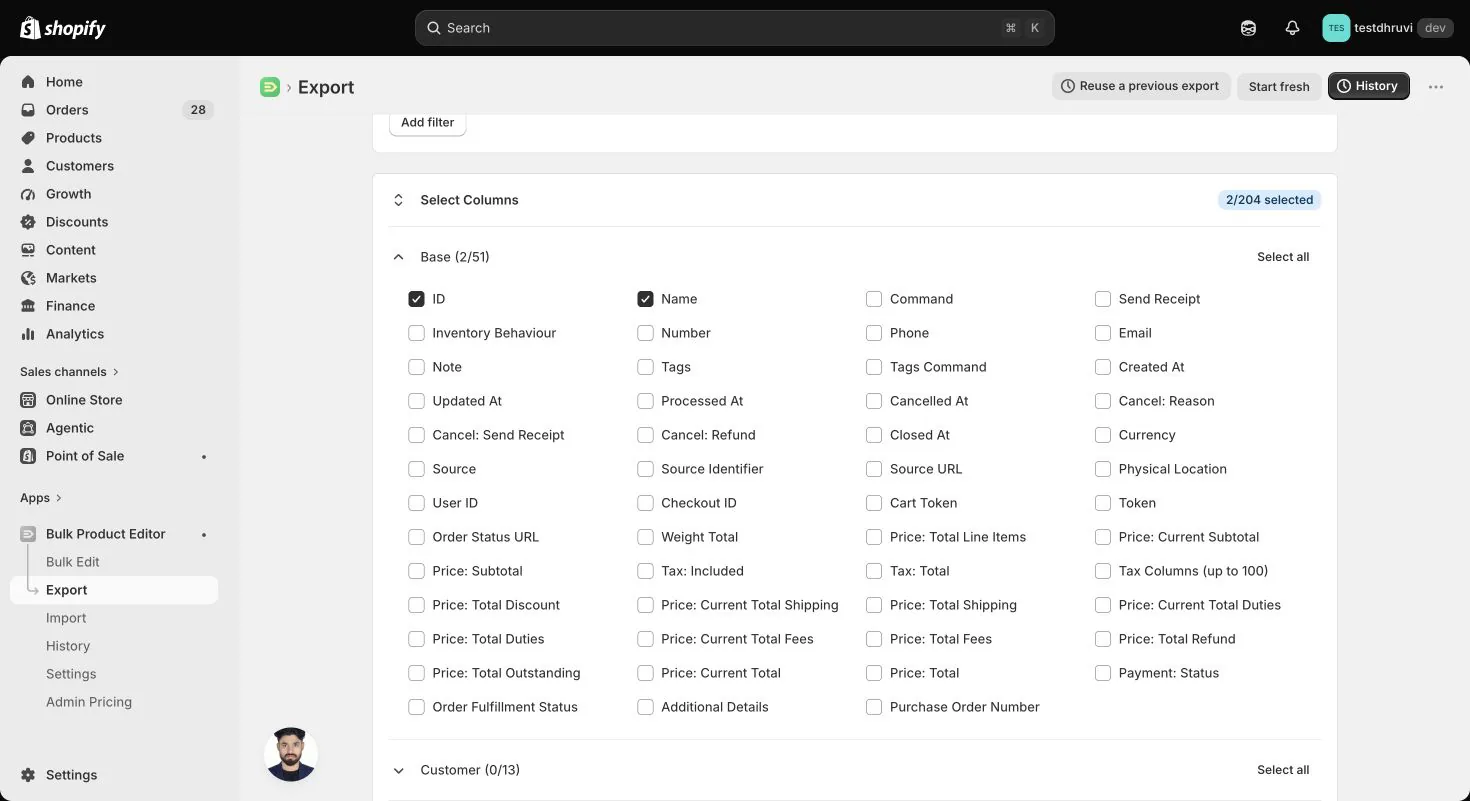
The screenshot shows the Orders column selector in the signed-in app. The column list is an export reference; it does not mean that every exported value can be imported.
Public Advanced Import supports Orders
NEW,UPDATE,MERGE, andIGNORE. OrderREPLACE,DELETE, refunds, order cancellation, and fulfillment cancellation are unavailable to normal merchant shops during the current rollout. A destructive-operation setting does not unlock them. Export templates and columns may still include those fields for reporting and format compatibility.
The comparison source is the official Matrixify Orders reference. The import treatment below describes EditEngine, including its narrower support for tax, discounts, customer matching, and line-item changes. Use the Orders export/import guide for filters and the complete workflow.
Read the import labels first
- Create and update: a non-empty value can be applied to a new order or a supported existing-order update.
- Create only: use it deliberately with
Command = NEW. Do not include it in a routine update file; some populated creation fields make an existing-order update fail. - Existing only: an operation on an order that already exists. It is not applied during
NEW. - Report only: the column can describe exported data, but EditEngine does not write that value through Orders import.
- Unavailable: the operation is not enabled for public Orders imports.
Use ISO currency codes such as USD, decimal money such as 19.95, positive whole-number line quantities, and explicit TRUE or FALSE for booleans. Exported dates include the store's time zone. IDs are store-specific: keep destination-store IDs for updates, and remove source-store IDs during migration.
Keep all rows of one order together. EditEngine groups by ID, then Name; an identity-free child row can join the preceding group. Neither Number nor Row # identifies an existing Shopify order. A Name must match exactly and uniquely. A public MERGE lookup miss does not create an order: use explicit NEW for creation.
Do not upload a full export unchanged. Exports write Command = NEW, and exported Line Item rows can append duplicate lines when changed to UPDATE. For an ordinary note or tag update, retain only ID, Command, and the fields you intend to change.
Base — 51 controls
Order totals, weight, tax columns, Note, Order Status URL, and order metafields appear only on the top row of an exported order group. Most other order fields repeat on child rows. Money uses the order's presentment amount when available, with shop money as the fallback; Transaction columns separately expose shop currency.
| Exported header or control | Meaning and example | Public Advanced Import treatment |
|---|---|---|
ID | Shopify order ID, for example 1234567890. | Identity. Takes priority over Name. A missing ID match fails for UPDATE or MERGE; it does not fall back to Name. |
Name | Merchant-facing order name, for example #1042. | Exact-match identity when ID is absent; also sets the name on NEW. Give each new multi-row order a unique repeated Name. |
Command | Export default is NEW. | NEW, UPDATE, MERGE, IGNORE. Missing row command uses the file default, then UPDATE. REPLACE and DELETE are unavailable. |
Send Receipt | Order-creation email flag; exports FALSE. | Create only. TRUE requests a receipt; omitted defaults to false. Not a general update notification switch. |
Inventory Behaviour | Inventory handling for a new order; exports bypass. | Create only. Shopify values: BYPASS, DECREMENT_IGNORING_POLICY, or DECREMENT_OBEYING_POLICY; default BYPASS. |
Number | Shopify's numeric order number, for example 1042. | Report only. Does not group new orders or identify an existing one. |
Phone | Order contact phone, for example +15555550123. | Create and update. Blank does not clear the current phone. Distinct from Customer: Phone. |
Email | Order contact email, for example buyer@example.com. | Create and update. Blank does not clear it. Does not edit the customer's profile email. |
Note | Order note, for example Deliver after 10am. | Create and update. Non-empty replaces the note; blank does not clear it. |
Tags | Comma-separated order tags, for example reviewed, wholesale. | Create and update. Always choose Tags Command for an update. Blank performs no tag change. |
Tags Command | Export default is REPLACE. | UPDATE/MERGE: MERGE adds, DELETE removes listed tags, REPLACE replaces the tag set. Blank defaults to REPLACE in EditEngine. |
Created At | Actual Shopify creation time. | Does not set actual creation time. If the Processed At header is absent, EditEngine reads this as a Processed At fallback; remove it from update files. |
Updated At | Latest Shopify update time. | Report only. Shopify manages it. |
Processed At | Business processing date, for example 2026-09-01T10:00:00Z. | Create only. Does not backdate Created At. |
Cancelled At | Cancellation time, or blank when not cancelled. | Unavailable for public cancellation. Remove from an update file even when preserving a historical report. |
Cancel: Reason | Exported reason, for example customer or inventory. | Unavailable for public cancellation. Does not edit a historical reason. |
Cancel: Send Receipt | Cancellation notification control; exports FALSE. | Unavailable for public cancellation. |
Cancel: Refund | Cancellation refund control; exports FALSE. | Unavailable for public cancellation/refunds. |
Closed At | Archive time, or blank for an open order. | Existing orders: non-empty archives now; an explicitly blank column unarchives. NEW can pass a non-empty closed-at value. Remove this column when archive state must stay unchanged. |
Currency | Order presentment currency, for example USD. | Create only, except it is also required when appending a custom line. New custom/explicit-price lines can fall back to shop currency if omitted; shipping and transaction rows have separate requirements below. |
Source | Recorded source, for example web. | Create only, as source name. Existing-order source is not updated. Shopify validates accepted source values. |
Source Identifier | External source reference, for example ERP-1042. | Report only in EditEngine; not written on NEW or UPDATE. |
Source URL | Original order's external URL. | Create only. Use a valid destination-relevant URL. |
Physical Location | Retail location where the order was placed. | Report only. Not a fulfillment-routing input. |
User ID | Legacy order staff-creator field. EditEngine exports blank. | Report only; no faithful current order field is available to populate it. |
Checkout ID | Legacy numeric checkout identifier. EditEngine exports blank. | Report only; not the checkout token. |
Cart Token | Token of the originating cart, when available. | Report only. |
Token | Token extracted from the order status URL, when available. | Report only. Do not use as import identity. |
Order Status URL | Customer-facing order status link. | Report only. Treat the link as customer data when sharing files. |
Weight Total | Order's recorded total weight in grams, for example 750. | Report only. NEW line weight uses Line: Grams instead. |
Price: Total Line Items | Sum of original line totals before order discounts. | Report only; for example 80.00. |
Price: Current Subtotal | Current subtotal after order changes. | Report only; for example 60.00. |
Price: Subtotal | Original subtotal. | Report only; for example 72.00. |
Tax: Included | Whether reported order prices include tax. | Report only in EditEngine; does not configure taxes on NEW. |
Tax: Total | Reported total tax amount. | Report only; not an imported tax override. |
Tax Columns (up to 100) | Expands to Tax n: Title, Tax n: Rate, Tax n: Price, Tax n: Channel Liable. Example: VAT, 0.20, 4.00, FALSE. | Report only. EditEngine does not import explicit order tax lines. |
Price: Total Discount | Original total discount amount. | Report only; for example 8.00. |
Price: Current Total Shipping | Current shipping total after order changes. | Report only; for example 5.00. |
Price: Total Shipping | Original shipping total. | Report only; for example 7.00. |
Price: Current Total Duties | Current duties total. | Report only; blank when unavailable. |
Price: Total Duties | Original duties total. | Report only; blank when unavailable. |
Price: Current Total Fees | Current additional fees total. | Report only; blank when unavailable. |
Price: Total Fees | Original additional fees total. | Report only; blank when unavailable. |
Price: Total Refund | Reported refunded total; blank when zero. | Report only. Does not request a refund. |
Price: Total Outstanding | Remaining outstanding amount; may be negative. | Report only; for example 20.00. |
Price: Current Total | Current overall order amount. | Report only; for example 69.00. |
Price: Total | Original overall order amount. | Report only; for example 85.00. |
Payment: Status | Financial status such as paid, pending, or authorized. | Create only. Shopify's enum also includes partially_paid, partially_refunded, refunded, voided, and expired. This field does not add a payment transaction to an existing order. |
Order Fulfillment Status | Order-wide state such as blank, partial, or fulfilled. | Report only. Creation reads Fulfillment: Status instead. |
Additional Details | One name: value pair per line, for example Gift wrap: yes. | Create and update custom attributes. Each pair needs a non-empty name and value; blank whole cell does not clear. Supply the intended attribute list. |
Purchase Order Number | Recorded PO reference, for example PO-210. | Report only in EditEngine. |
The order tax selector emits at least three tax blocks and expands up to 100 when the exported data needs them. A rate of 0.20 means 20%. Preserve the difference between order header Tax 1: Title and line header Line: Tax 1 Title—the latter has no colon after the number.
Customer — 13 controls
These columns describe the linked customer, not the shipping recipient. Editing customer profile fields belongs in a Customers import. EditEngine does not reproduce Matrixify's documented customer lookup/create behavior from the Orders customer block.
| Exported header | Meaning and example | Public Advanced Import treatment |
|---|---|---|
Customer: ID | Linked customer ID, for example 2345678901. | Existing only: non-empty sets that customer; explicitly blank removes the current customer. Not applied by NEW. Omit the column to preserve the link. |
Customer: Email | Customer profile email, falling back to order email for export. | If the Email header is absent, this is an order contact email alias on create/update. It is not a customer lookup or profile update. |
Customer: Phone | Customer profile phone; blank if none is stored. | Report only. Never used as a customer lookup or as the order phone input. |
Customer: First Name | Customer's given name, for example Alex. | Report only; use Customers to update the profile. |
Customer: Last Name | Customer's family name, for example Morgan. | Report only. |
Customer: Note | Note on the customer profile. | Report only; separate from the order Note. |
Customer: Orders Count | Customer order count, for example 4. | Report only. |
Customer: State | Account state, for example enabled or disabled. | Report only. |
Customer: Total Spent | Customer profile's recorded amount spent. | Report only. |
Customer: Tags | Customer tags, for example vip, wholesale. | Report only; separate from order Tags. |
Customer: Email Marketing Status | Recorded email marketing state, such as subscribed. | Report only; an Orders import cannot change consent. |
Customer: SMS Marketing Status | Recorded SMS marketing state, such as not_subscribed. | Report only; an Orders import cannot change consent. |
Customer: Tax Exempt | Customer tax-exempt flag, TRUE or FALSE. | Report only; not a way to configure order tax. |
Addresses and Browser Details — 40 controls
Billing fields are create only. Shipping fields can create or update an address. Blank address fields are omitted; they do not clear existing values. Supply a consistent full destination address when changing its country or province, then verify Shopify's result. Preserve ZIP codes and phone numbers as text.
| Exported header | Meaning and example | Public Advanced Import treatment |
|---|---|---|
Billing: First Name | Billing given name, for example Alex. | Create only. Blank omitted. |
Billing: Last Name | Billing family name, for example Morgan. | Create only. Blank omitted. |
Billing: Name | Full billing name, for example Alex Morgan. | Create only. Split at the first space when First Name/Last Name are not supplied. |
Billing: Company | Billing company, for example Example Studio. | Create only. |
Billing: Phone | Billing phone with country code. | Create only. |
Billing: Address 1 | Street and building, for example 10 Market Street. | Create only. |
Billing: Address 2 | Additional address line, for example Suite 2. | Create only. |
Billing: Zip | Postal code, for example 02108. | Create only; keep as text. |
Billing: City | City, for example Boston. | Create only. |
Billing: Province | Province/state name, for example Massachusetts. | Create only. |
Billing: Province Code | Province/state code, for example MA. | Create only. |
Billing: Country | Country name, for example United States. | Create only. |
Billing: Country Code | Two-letter country code, for example US. | Create only. |
Shipping: First Name | Recipient given name, for example Alex. | Create and update. Blank omitted. |
Shipping: Last Name | Recipient family name, for example Morgan. | Create and update. Blank omitted. |
Shipping: Name | Full recipient name, for example Alex Morgan. | Create and update. First word supplies missing First Name; remaining words supply missing Last Name. |
Shipping: Company | Recipient company, for example Example Studio. | Create and update. Blank does not clear. |
Shipping: Phone | Recipient phone with country code. | Create and update. Blank does not clear. |
Shipping: Address 1 | Destination street and building. | Create and update. Blank does not clear. |
Shipping: Address 2 | Apartment, unit, or suite. | Create and update. Blank does not clear. |
Shipping: Zip | Postal code, for example 02108. | Create and update; keep as text. |
Shipping: City | Destination city, for example Boston. | Create and update. |
Shipping: Province | Province/state name, for example Massachusetts. | Create and update. |
Shipping: Province Code | Province/state code, for example MA. | Create and update. |
Shipping: Country | Country name, for example United States. | Create and update. |
Shipping: Country Code | Two-letter country code, for example US. | Create and update. |
Browser: IP | Order client IP when available. | Report only. |
Browser: Width | Legacy browser width. EditEngine exports blank. | Report only. |
Browser: Height | Legacy browser height. EditEngine exports blank. | Report only. |
Browser: User Agent | Legacy browser identifier. EditEngine exports blank. | Report only. |
Browser: Landing Page | First-visit landing URL. | Report only. |
Browser: Referrer | First-visit referring URL. | Report only. |
Browser: Referrer Domain | Source reported by Shopify's first-visit journey data. | Report only; can differ from a literal referrer hostname. |
Browser: Search Keywords | Legacy search-keywords field. EditEngine exports blank. | Report only. |
Browser: Ad URL | Legacy advertising URL field. EditEngine exports blank. | Report only. |
Browser: UTM Source | Campaign source, for example newsletter. | Report only. |
Browser: UTM Medium | Campaign medium, for example email. | Report only. |
Browser: UTM Campaign | Campaign name, for example spring_launch. | Report only. |
Browser: UTM Term | Campaign term when available. | Report only. |
Browser: UTM Content | Campaign content label, for example header_link. | Report only. |
Company — 6 controls
The company block reports the B2B purchasing company and location. None of these fields changes an order's purchasing entity through the current EditEngine Orders importer.
| Exported header | Meaning and example | Public Advanced Import treatment |
|---|---|---|
Company: ID | Purchasing company Shopify ID. | Report only. |
Company: Name | Company display name, for example Example Wholesale. | Report only. |
Company: External ID | Company's external reference, for example ERP-C21. | Report only. |
Company: Location ID | Purchasing company-location Shopify ID. | Report only. |
Company: Location Name | Company location name, for example East Branch. | Report only. |
Company: Location External ID | External reference for that company location. | Report only. |
Line Items — 31 controls
One order can contain Line Item, Discount, Shipping Line, Refund Line, Refund Shipping, Transaction, and Fulfillment Line rows. A column's meaning depends on that row type. Fulfillment and refund rows can echo the original product line; their negative quantities are reporting conventions, not instructions to subtract items.
For existing orders, EditEngine appends a variant or custom item; it does not edit, replace, or remove an existing line by its Line: ID. A Variant ID is the supported catalog reference. SKU, product handle, product ID, and variant title do not resolve a variant in this importer. Repeating an append file can add the item again.
| Exported header or control | Meaning and example | Public Advanced Import treatment |
|---|---|---|
Row # | Sequential export row number. | Report only; not identity or a command. |
Top Row | TRUE on the first row of an order group. | Report only; grouping uses ID/Name rather than this flag. |
Line: Type | Row kind, for example Line Item or Shipping Line. | Line Item creates/appends; Shipping Line and non-refund Transaction are NEW-only. Fulfillment Line requires a supported existing tracking operation. Discount rows are unsupported; refund rows are unavailable publicly. |
Line: ID | Existing line identity; its object depends on row type. | Report only; does not prevent duplicate line append or select a line to edit. Refund Shipping uses Shopify's refund-shipping-line ID, which can differ from Matrixify's legacy adjustment ID. |
Line: Command | Compatible export default DEFAULT. | Not an execution switch in EditEngine. Setting DELETE/REPLACE/IGNORE here does not remove, replace, or safely skip an item. Remove unwanted rows. |
Line: Product ID | Linked product Shopify ID. | Report only; use destination Line: Variant ID to link a catalog item. |
Line: Product Handle | Linked product handle, for example cotton-shirt. | Report only; not a product lookup input. |
Line: Title | Item title; on Shipping Line, rate title; on Discount, value type. | Creates a line title/custom item or NEW shipping title. A populated Line Item title can request an append. |
Line: Name | Line display name; shipping rate code; discount code/title. | Item-title fallback only when Line: Title header is absent. Does not import a discount or shipping code. |
Line: Variant ID | Linked product-variant Shopify ID. | New line or append reference. Use an ID from the destination store. Blank produces a custom line when a title/SKU is supplied. |
Line: Variant Title | Variant option label; blank for Default Title. On shipping rows, rate source. | Report only; not a variant lookup input. |
Line: SKU | SKU recorded on the order line, for example SHIRT-M. | NEW can set the line SKU; does not find a catalog variant. For a custom append it is only a fallback title. |
Line: Quantity | Purchased quantity; negative on refund/fulfillment report rows. | New/append item requires a positive integer. Blank defaults to 1. Does not update existing-line quantity. |
Line: Price | Original item unit price; shipping rate price; discount/refund context varies. | NEW: explicit non-negative money sets price, including zero. Blank variant price uses catalog price; blank custom price becomes 0.00. Custom append uses this price; variant append uses catalog pricing. Shipping price is NEW-only. |
Line: Discount | Negative line discount amount, for example -5.00. | Report only. Does not add a discount during NEW or append. |
Line: Discount Allocation | Negative allocated discount amount. | Report only. |
Line: Discount per Item | Negative per-unit discount. | Report only. |
Line: Total | Line amount; negative on refund and fulfillment report rows. | Report only; totals are not imported as line prices. |
Line: Grams | Recorded unit weight in grams, for example 250. | NEW only, non-negative number. Existing-line or appended-variant weight is not edited. |
Line: Requires Shipping | Whether the item requires delivery, TRUE/FALSE. | NEW item or custom append. Blank custom-append value defaults to true. Not an existing-line change. |
Line: Vendor | Vendor recorded on the order line. | Report only. |
Line: Properties | Item properties as name: value lines. | Report only in the current Orders importer; not written to a new/appended item. |
Line: Gift Card | Whether the original item is a gift card. | Report only. Does not create or issue a gift card. |
Line: Force Gift Card | Compatible control; exports No. | Not supported as an import action. Does not force gift-card creation. |
Line: Taxable | Item taxability, TRUE/FALSE. | NEW item or custom append. Blank custom-append value defaults to true. Does not import a specific tax rate/amount. |
Line: Tax Total | Reported tax total for this row. | Report only. |
Line: Tax Columns (up to 100) | Expands to Line: Tax n Title, Line: Tax n Rate, Line: Tax n Price, Line: Tax n Channel Liable. | Report only. Taxable may be imported; explicit tax lines are not. |
Line: Fulfillable Quantity | Remaining fulfillable units after fulfilled/refunded/removed quantities. | Report only; not a request to fulfill those units. |
Line: Fulfillment Service | Compatible service label; currently manual. | Report only; does not route fulfillment. |
Line: Fulfillment Status | Blank for unfulfilled, or partial/fulfilled. | Report only. Does not fulfill or unfulfill an item. |
Line: Pre Tax Price | Discounted before-tax amount; blank when taxes are not included. | Report only. |
The line tax selector also emits at least three blocks and expands up to 100. Refund taxes can be negative; fulfillment rows echo the source line's positive taxes. EditEngine preserves the line's recorded weight, using current catalog weight only when it agrees at Shopify's recorded precision. Use the next group to inspect today's catalog values separately.
Line Items Product Data — 13 controls
Every field in this group is report only and reads the current linked catalog, not a historical order snapshot. A deleted or custom variant leaves its variant columns blank. Editing these cells changes neither the order nor the product.
| Exported header | Meaning and example | Public Advanced Import treatment |
|---|---|---|
Line: Product Type | Current product type, for example Shirts. | Report only. |
Line: Product Tags | Current product tags, for example cotton, summer. | Report only. |
Line: Variant SKU | Current variant SKU, which may differ from Line: SKU. | Report only. |
Line: Variant Barcode | Current variant barcode, kept as text. | Report only. |
Line: Variant Weight | Current variant weight in its recorded unit. | Report only. |
Line: Variant Weight Unit | Current unit: g, kg, oz, or lb. | Report only. |
Line: Variant Inventory Qty | Current variant inventory quantity. | Report only. |
Line: Variant Cost | Current variant cost amount. | Report only. |
Line: Variant Price | Current catalog selling price. | Report only; separate from the order's Line: Price. |
Line: Variant Compare At Price | Current catalog compare-at price. | Report only. |
Line: Variant Country of Origin | Current origin country code, for example IN. | Report only. |
Line: Variant Province of Origin | Current origin province code, when present. | Report only. |
Line: Variant HS Code | Current harmonized tariff code, kept as text. | Report only. |
Refunds — 8 controls
Use these columns to inspect historical refunds. Public Orders imports cannot execute refunds, even when a refund-related export template is visible. Remove Refund Line, Refund Shipping, and refund Transaction rows from an ordinary update file.
| Exported header | Meaning and example | Public Advanced Import treatment |
|---|---|---|
Refund: ID | Historical Shopify refund ID. | Unavailable for public refund workflows. A populated cell can classify a row as a refund; it is not a harmless import identifier. |
Refund: Created At | Historical refund time. | Report only; cannot backdate a refund. |
Refund: Note | Note attached to the refund. | Unavailable for public refund workflows. |
Refund: Restock | Whether a reported refund restocked any included item. | Report only. No public restock action; EditEngine does not replay exported refund-line restock details. |
Refund: Restock Type | Reported restock type, for example return or no_restock. | Report only; not replayed as inventory movement. |
Refund: Restock Location | Reported restock location name. | Report only; not an import location selector. |
Refund: Send Receipt | Refund notification flag; exports FALSE. | Unavailable for public refund workflows. |
Refund: Generate Transaction | Compatible control; exports FALSE. | Not a supported public refund action. |
Transactions and Risk — 30 controls
Transaction rows report payment events; their IDs and card details cannot be edited to alter a payment. For deliberate NEW orders, EditEngine accepts the supported transaction inputs below. Non-refund transactions cannot be added to an existing order through this importer. A refund kind requests an unavailable public operation.
| Exported header | Meaning and example | Public Advanced Import treatment |
|---|---|---|
Transaction: ID | Historical transaction Shopify ID. | Report only; not an existing-transaction update key. |
Transaction: Kind | Payment event kind, for example sale, capture, or authorization. Shopify's enum also includes change, emv_authorization, refund, suggested_refund, and void. | Create only for non-refund kinds that Shopify accepts. REFUND is unavailable publicly. Include amount and currency for a new transaction; these values are not existing-payment commands. |
Transaction: Processed At | Transaction processing date. | Create only. Omitted leaves the processing date to Shopify. |
Transaction: Amount | Amount in transaction currency; refunds export negative. | Create only, non-negative decimal for supported non-refund kinds. Required whenever a non-refund kind is supplied. |
Transaction: Currency | Transaction presentment currency, for example USD. | Create only. If blank, falls back to the order Currency; one of the two must be supplied. |
Transaction: Shop Currency Amount | Same reported transaction in shop money. | Report only; not a second imported amount. |
Transaction: Shop Currency | Shop currency code, for example EUR. | Report only; not the transaction input currency. |
Transaction: Status | Shopify transaction state: success, pending, failure, error, awaiting_response, or unknown. | Create only; blank defaults to SUCCESS. Shopify validates the state for the transaction kind. |
Transaction: Message | Legacy transaction message; EditEngine exports blank. | Report only. |
Transaction: Gateway | Recorded gateway, for example manual. | Create only; blank defaults to manual for a non-refund transaction. |
Transaction: Force Gateway | Compatible control; exports FALSE. | Not supported as an import override. |
Transaction: Payment Method | Payment method name, when provided by Shopify. | Report only. |
Transaction: Wallet | Card-wallet value, when available. | Report only. |
Transaction: Test | Whether the reported transaction was a test, TRUE/FALSE. | Report only; does not mark an import as a test. |
Transaction: Authorization | Gateway authorization code. | Create only. Does not request authorization of a customer's card. |
Transaction: Payment ID | Provider payment reference. | Report only. |
Transaction: Device ID | Device Shopify ID, when available. | Report only. |
Transaction: User ID | Staff member who processed the transaction, when accessible. | Report only. Requires optional read_users access under Shopify's staff-data eligibility rules; blank when access or staff data is unavailable. |
Transaction: Parent ID | Parent payment transaction ID. | Report only; not an imported parent-selection control. |
Transaction: Error Code | Recorded gateway error, when present. | Report only. |
Transaction: CC AVS Result | Address-verification result code. | Report only. |
Transaction: CC Bin | Card BIN supplied by Shopify. | Report only. |
Transaction: CC CVV Result | Card-verification result code, not a security code. | Report only. |
Transaction: CC Number | Masked card/account number supplied by Shopify. | Report only. Never put a full card number in an import file. |
Transaction: CC Company | Card network, for example Visa. | Report only. |
Risk: Source | Assessment provider, for example Shopify. | Report only; blank when there is no risk recommendation. |
Risk: Score | Legacy numeric risk score. EditEngine exports blank. | Report only. |
Risk: Recommendation | Reported recommendation such as accept or investigate. | Report only. |
Risk: Cause Cancel | Compatible historical flag; FALSE when the risk block exists. | Report only; does not trigger cancellation. |
Risk: Message | Assessment facts, one per line. | Report only. |
Fulfillments — 11 controls
The public existing-order operation here is a tracking update for an existing Fulfillment: ID. It does not create a fulfillment. Use Line: Type = Fulfillment Line and remove copied product-line columns; an existing shipment may export several child rows, but a tracking update needs only one intentional row per fulfillment.
| Exported header | Meaning and example | Public Advanced Import treatment |
|---|---|---|
Fulfillment: ID | Existing fulfillment Shopify ID. | Existing tracking-update identity, required whenever a tracking number, URL, or company is supplied. Must belong to the target store. |
Fulfillment: Status | Reported status, for example success or cancelled. | NEW can set order-level fulfillment state: FULFILLED, PARTIAL, or RESTOCKED; SUCCESS maps to FULFILLED. On an existing fulfillment, CANCELLED is unavailable publicly; other status values do not change fulfillment state. |
Fulfillment: Created At | Fulfillment creation time. | Report only. |
Fulfillment: Updated At | Fulfillment update time. | Report only. |
Fulfillment: Processed At | Legacy processing timestamp; EditEngine exports blank. | Report only. |
Fulfillment: Tracking Company | Carrier name, for example UPS. | Existing tracking update. Blank does not clear it. Supply one intended carrier name. |
Fulfillment: Location | Location name used by the fulfillment. | Report only; not a routing or reassignment input. |
Fulfillment: Shipment Status | Tracking-event state, such as in_transit or delivered; otherwise blank. | Report only; does not create a tracking event. |
Fulfillment: Tracking Number | Tracking number; multiple values separated with ; . | Existing tracking update. Use semicolon-separated numbers; blank does not clear them. |
Fulfillment: Tracking URL | Tracking link; multiple values separated with ; . | Existing tracking update. Use semicolon-separated valid URLs; blank does not clear them. |
Fulfillment: Send Receipt | Tracking-update notification flag. Exports FALSE. | Existing tracking update: TRUE requests a customer notification; blank defaults to false. A flag alone does not trigger a tracking update. |
Metafields — 1 dynamic control
| Exported header or control | Meaning and example | Public Advanced Import treatment |
|---|---|---|
Metafields | Expands to selected Metafield: namespace.key [type] headers, for example Metafield: custom.delivery_note [single_line_text_field]. | Existing only. Non-empty sets that order metafield; explicitly blank deletes it. Not applied by NEW. Omit the column to preserve its value. |
Use the exact namespace, key, and Shopify type. If a type is omitted, the Orders importer assumes single_line_text_field. Order list metafields export as comma-separated display values, but this importer passes your supplied cell value to Shopify without converting a list back to JSON. For a list update, provide the type's valid JSON array, for example ["priority","gift"], rather than re-importing the display text unchanged. Reference and structured types likewise require destination-valid values. Do not treat an exported list or source-store reference as automatically ready for import.
Worked example: add a reviewed tag safely
This updates one existing order without changing its note, address, customer, archive state, or lines.
- In EditEngine → Export, select Orders, filter to the intended order, and export
ID,Name, andTags. Keep that file untouched as your reference. - Make a new CSV named
Orders.csvor an XLSX worksheet namedOrders. Keep one row per intended order with the following headers. Replace the example ID with an actual ID from your export.
ID,Command,Tags,Tags Command
1234567890,UPDATE,reviewed,MERGE- Open EditEngine → Import → Advanced import, upload the file, and confirm the detected resource is Orders. Check the selected sheet, command, column diagnostics, and any sample rows shown before starting your own import. A sample is not a full-file or before-and-after validation; review all rows in the spreadsheet separately.
- Test one non-critical order first. After it completes, review the result file and confirm in Shopify that the old tags remain and
reviewedwas added. Only then expand the file.
A missing Tags Command defaults to REPLACE in EditEngine, so keep MERGE explicit. To remove the newly added tag later, you can prepare another targeted UPDATE with Tags = reviewed and Tags Command = DELETE, but only if that tag was not already present before the change. This is a corrective import, not app-native undo.
Before you import any Orders file
Verify the row count, identity, and row types. Public files are limited to 50,000 data rows. Keep an untouched export and start with one non-critical order. Remove report-only columns and copied child rows from update files. Pay particular attention to the three blank-cell actions: Customer: ID removes the customer, Closed At unarchives, and a selected Metafield cell deletes that value.
Matrixify documents broader Orders imports, including customer resolution, explicit taxes, discounts, and destructive commands. Those instructions do not establish EditEngine support. The Matrixify Orders reference and bulk order-update tutorial are useful format comparisons; follow the EditEngine treatment in this reference for your file.
Related tutorials
- Export and import Shopify Orders — templates, filters, row grouping, and the Advanced Import workflow.
- Export and import Shopify Draft Orders — use the separate draft lifecycle when preparing orders that are not yet final.
- Export and import Shopify Customers — change customer profiles separately from order contact fields.
- Export and import Shopify Metafields — plan typed custom data and owner references.