
Getting started
Import and Export Resource Availability
Published by Profitonium Apps · Last updated
EditEngine exposes 19 export resources. That does not mean all 19 can be imported. As verified on 4 October 2026, Advanced Import enables 13 resources for public merchant stores, restricts 4 to internal test shops, and treats 2 as export-only.
An export control, recognized worksheet, screenshot, or published guide is not proof that an operation is enabled on your store. Shopify permissions, store capabilities, and your EditEngine plan also apply. A test-shop screenshot can show an import workflow that an ordinary merchant cannot start.
Resource coverage
All resources below have export guides. Follow the linked guide for columns, filters, commands, and exact limitations.
| Resource and guide | Export | Advanced Import availability |
|---|---|---|
| Products | Available | Public; import Products separately from other executable resources |
| Custom Collections | Available | Public; legacy manual collection format |
| Smart Collections | Available | Public; legacy automated collection format |
| Customers | Available | Public |
| Companies | Available | Internal test shops only |
| Discounts | Available | Public |
| Draft Orders | Available | Public; completed drafts permit tags-only updates |
| Orders | Available | Public with narrower commands and operation limits below |
| Payouts | Available | Export-only; cannot create or change payouts |
| Pages | Available | Public |
| Blog Posts | Available | Public |
| Redirects | Available | Internal test shops only |
| Activity | Available | Export-only; cannot rewrite the activity log |
| Files | Available | Internal test shops only |
| Metaobjects | Available | Public; existing definitions are required |
| Menus | Available | Public |
| Shop | Available | Public for the supported shop fields; not a clone of every Shopify setting |
| Metafields | Available | Public for supported owners and value types |
| Translations | Available | Internal test shops only |
“Available” describes the resource, not unlimited access to all records. For example, older Orders need Shopify's protected all-orders access, Companies needs accessible B2B data, and Payouts needs Shopify Payments data. Check your store's permissions and the resource guide.
Use Advanced Import and review the detected sheet
Open EditEngine → Import, choose Advanced import, and upload your prepared CSV or XLSX. Keep an untouched export first. Confirm the detected resource, sheet, headers, commands, and row count before starting a small test with non-critical records.
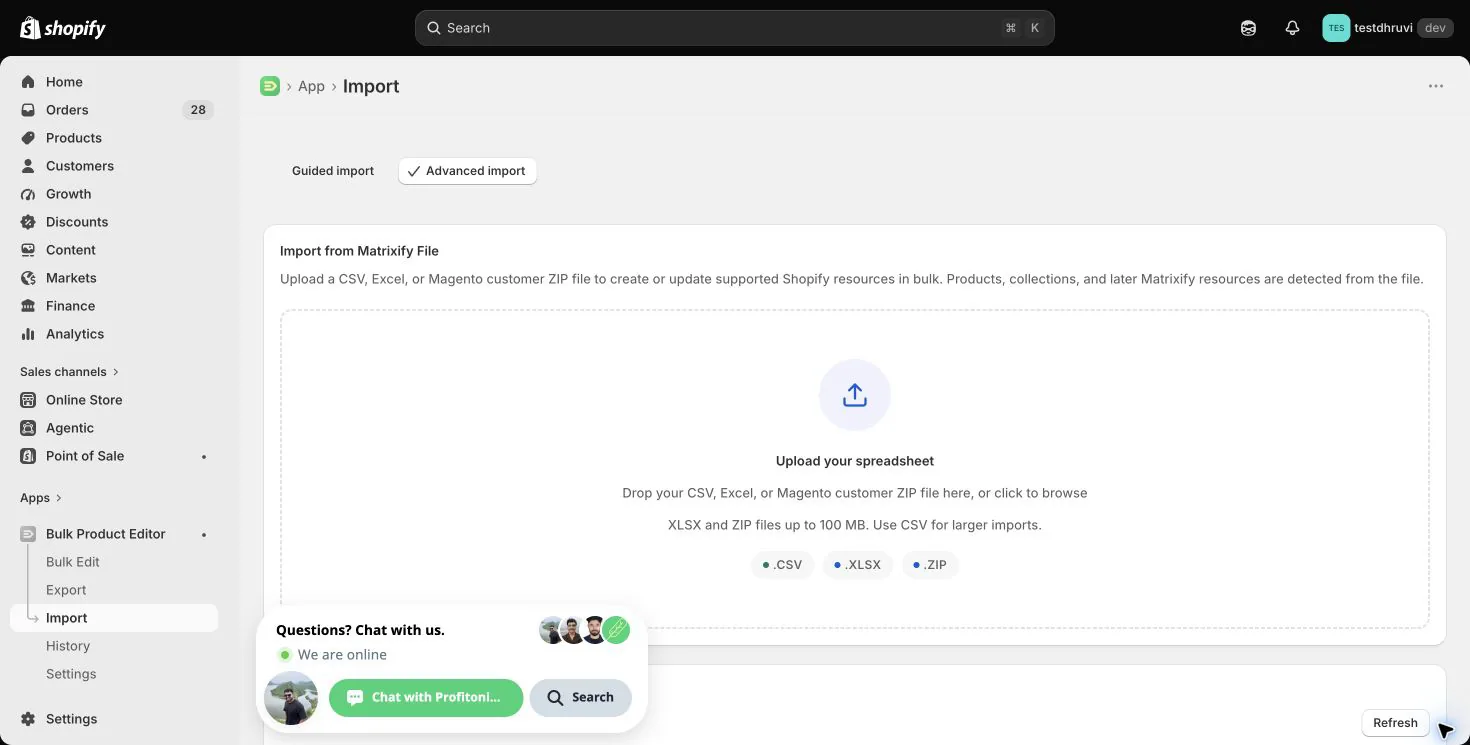
Review the detected headers and any sample rows shown. A sample is not a full-file or before-and-after validation. Check the actual file in your spreadsheet editor, including rows outside the sample. A recognized sheet can still be blocked by availability or permission checks.
If the file contains Products plus another executable resource, prepare a separate Products workbook. Do not expect one mixed file to import Products alongside its dependent resources. Import destination dependencies separately and review their resulting Shopify IDs before linking records.
Important round-trip limits
- Orders: public imports accept
NEW,MERGE,UPDATE, andIGNORE, up to 50,000 data rows.REPLACE,DELETE, refunds, order cancellation, and fulfillment cancellation remain internal-test-only. A destructive-operation option cannot unlock them. An Orders export is not safe to re-import unchanged: existing Line Item rows can become additional lines. - Draft Orders: a completed draft accepts only tags-only
UPDATEorMERGE. Invoice sending and completion are actions, not harmless report columns. Later blank metafield cells can override earlier values in a multi-row group. - Products: extra columns are not always harmless. Blank Available inventory cells can remove a variant's inventory at that location, and blank catalog prices can remove fixed prices. Keep only fields you intend to change.
- Collections: Matrixify now has a unified Collections format. EditEngine's Custom/Smart resources do not import that new source/condition schema. Renaming a sheet does not convert it.
- All imports: Shopify IDs belong to one store. Omit or remap source-store IDs for migration. Import support does not mean every export column is writable or every blank cell means “leave unchanged.”
Use the detailed Products, Orders, and Draft Orders column references for field-level values and blank-cell rules.
Verify before scaling up
After your small test, review the result file and warnings, inspect the affected records in Shopify Admin, and compare a new focused export with your intended changes. Retain the original export and result file. Advanced Import does not have the bulk editor's one-click undo; a corrective spreadsheet is not a guaranteed recovery of deleted IDs or associations.
Related tutorials
- Products export and import — product and variant identities, media, inventory, and pricing.
- Orders export and import — public-safe tag and tracking examples and order-specific restrictions.
- Draft Orders export and import — draft lines, invoices, completion, and tags-only completed-draft updates.