
Products
Shopify Products Column Reference
Published by Profitonium Apps · Last updated
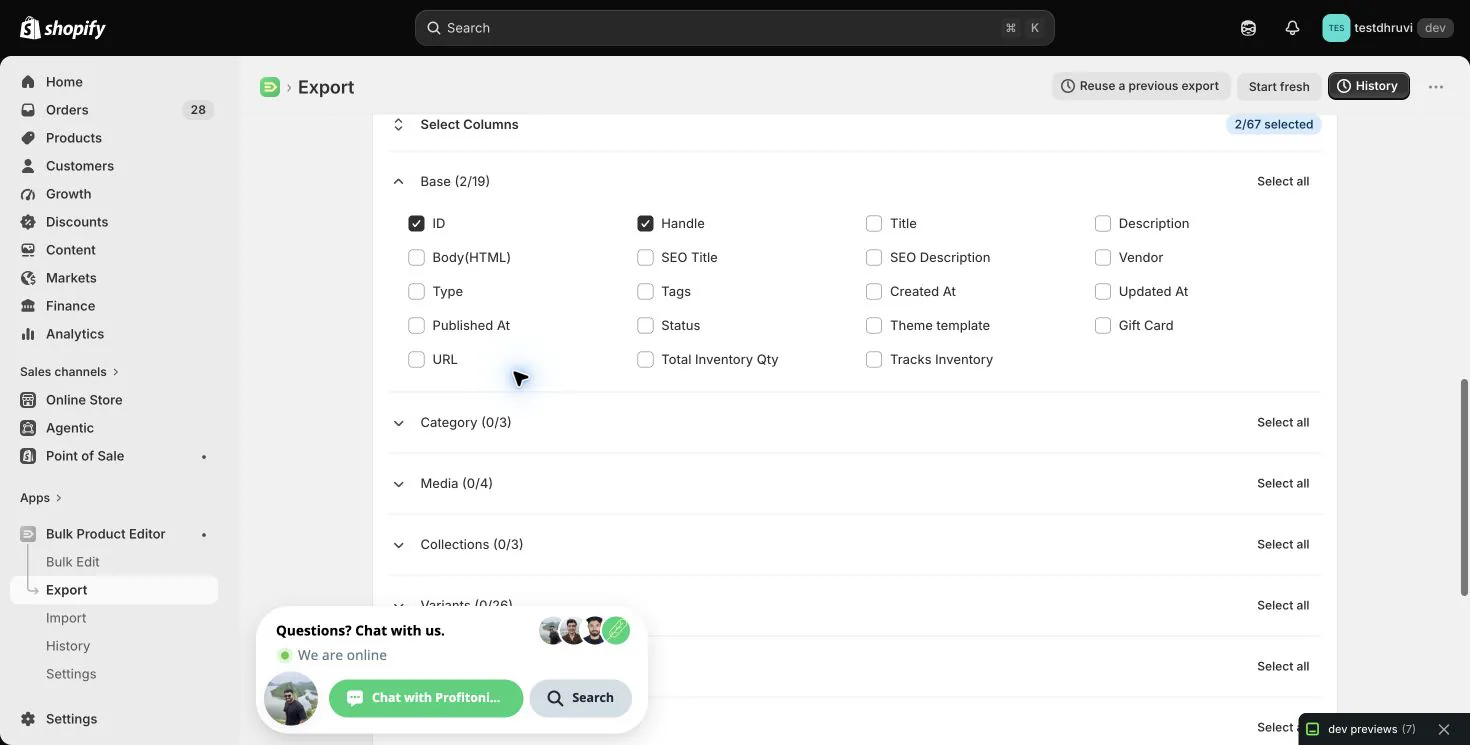
Use this reference when choosing Products export columns or reviewing a spreadsheet for Advanced Import in EditEngine. The tables cover all 67 selectable export controls, including the dynamic controls that expand into multiple location, catalog, or metafield headers.
The tables also distinguish a column that appears in an export from a column you can safely import. A recognized header does not make every value valid: Shopify still validates your store's products, categories, locations, catalogs, and metafield definitions.
This reference was checked against the official Matrixify Products documentation. Use the EditEngine behavior here where the two apps differ; do not assume every Matrixify export header or tutorial works unchanged.
Read these rules before editing cells
- Importable means the field can supply an update, subject to the conditions in its row. Identity locates a record; Shopify IDs are not editable values. Export-only is recognized for reference but does not update Shopify. Unsupported header needs removal or renaming before import review.
- The blank-cell rules below describe ordinary MERGE or UPDATE of an existing product with default import settings. Omitting a column generally leaves that field unchanged. A selected column with an empty cell can mean something different.
- Product REPLACE deletes and recreates the product. The preservation rules for ordinary updates do not apply. Keep an untouched export and test one non-critical product; Advanced Import has no one-click undo.
- Product-level fields use the first non-empty value in the product block. Keep all rows for a product adjacent, including variant and media continuation rows. Do not interpret an empty continuation cell as a separate product update.
- Use
TRUEandFALSEfor booleans, plain decimal amounts such as19.99, whole numbers for quantities, and text formatting for IDs, SKUs, barcodes, and customs codes. Preserve leading zeroes. - Keep Product
IDfor same-store updates. Remove source-store product, variant, inventory-item, media, and other Shopify IDs before cross-store creation. Remap locations, catalogs, collections, and reference metafields to the destination.
Blank cells that can change data: empty description, vendor, type, template, SEO, category, compare-at price, cost, metafield, and some inventory/catalog cells can clear or remove data. Blank
Variant Tracked,Variant Taxable, andVariant Requires Shippingcan turn those flags off. Remove columns you are not deliberately changing.
Base — 19 controls
ID and Handle are always the first exported columns, even when their visible toggles are cleared.
| Export column | Meaning and accepted value | Advanced Import and blank-cell behavior |
|---|---|---|
ID | Product Shopify ID; for example gid://shopify/Product/123456789 or its numeric ID. | Identity. Highest-priority ordinary match. Blank permits another identifier; it does not clear the ID. |
Handle | Product URL handle; for example linen-shirt. | Identity and importable. Can rename an ID-matched product. Blank leaves an existing handle unchanged. Use a unique same-store ID when renaming. |
Title | Product title; for example Linen Shirt. | Importable; fallback identity. Required and non-empty for creation and recreation. Blank preserves the existing title. Duplicate exact titles are ambiguous. |
Description | Plain-text description, without HTML formatting. | Export-only. Use Body(HTML) to change the description; an edit here does not update it. |
Body(HTML) | Description HTML; for example <p>Lightweight linen.</p>. | Importable. Blank clears the description. Body HTML and Body (HTML) are also recognized headers. |
SEO Title | Search listing title; for example Linen Shirt – Summer Collection. | Importable. Blank clears the custom SEO title. An omitted SEO Description is preserved if its current value can be read; otherwise the partial SEO update is skipped with a warning. |
SEO Description | Search listing description; plain text. | Importable. Blank clears the custom SEO description. The same preservation rule applies to an omitted SEO Title. |
Vendor | Vendor label; for example Acme. | Importable. Blank clears the vendor. |
Type | Merchant-defined product type; for example Shirts. | Importable. Blank clears the type. This is separate from Shopify's taxonomy Category. |
Tags | Comma-separated tag names; for example summer, linen. | Importable. Default MERGE adds the supplied tags. Blank MERGE or DELETE changes nothing; blank with explicit Tags Command=REPLACE clears every tag. |
Created At | Shopify creation timestamp. | Export-only. Blank or edited values do not change the timestamp. |
Updated At | Shopify last-update timestamp. | Export-only. Shopify maintains it. |
Published At | Online Store publication time; use an unambiguous date and time with timezone, such as 2026-10-01T09:00:00+05:30. | Importable publication instruction. A supplied date requests publication at that date. Blank alone does not unpublish. Review Published and Published Scope below before importing historical dates. |
Status | ACTIVE, DRAFT, ARCHIVED, or UNLISTED, case-insensitively. | Importable. Blank preserves existing status. Status and sales-channel publication are separate; publishing a Draft or Archived product does not make it available. |
Theme template | Theme template suffix; for example featured, without product. or the file extension. | Importable. Blank restores the default template. Template Suffix is an accepted alias. The corresponding template must exist in your theme. |
Gift Card | TRUE or FALSE; whether the product is a gift-card product. | Creation-only setting. Existing products cannot be converted between ordinary and gift-card products. Omit this column for ordinary updates; blank is not a conversion instruction. |
URL | Exported Online Store preview/product URL. | Export-only. Use Handle to change the product URL handle. |
Total Inventory Qty | Product inventory total across its variants. | Export-only. Use a variant/location quantity column to update inventory. |
Tracks Inventory | Product-level inventory-tracking summary. | Export-only. Use Variant Tracked to change a variant's tracking. |
Category — 3 controls
Use one unambiguous category identifier. If you keep several category columns, make their values agree. If a category column is present but all supplied category values are blank, EditEngine clears the category.
| Export column | Meaning and accepted value | Advanced Import and blank-cell behavior |
|---|---|---|
Category: ID | Shopify taxonomy category ID; for example aa-1 or gid://shopify/TaxonomyCategory/aa-1. | Importable. Highest-priority category input. Legacy numeric taxonomy IDs require resolution. Blank participates in the category-clear rule above. |
Category: Name | Category name; for example Clothing. | Importable with lookup. A name must identify one category; use the ID or full path if ambiguous. Blank participates in the category-clear rule. |
Category | Full taxonomy path; for example Apparel & Accessories > Clothing. An ID or ID plus path is also accepted. | Importable with lookup. Keep the exported value or use a valid destination category. Blank participates in the category-clear rule. |
Media — 4 controls
Media and variants are independent lists even when they occupy the same spreadsheet row. A gallery image beside a variant row does not automatically become that variant's image.
| Export column | Meaning and accepted value | Advanced Import and blank-cell behavior |
|---|---|---|
Image Src | Public, direct media URL; for example https://example.com/shirt-front.jpg. Multiple URLs can be separated with semicolons. | Importable. Default Image MERGE retains existing media and adds new sources. An exact existing URL is reused. Blank normally adds nothing; Image REPLACE can remove the existing gallery. |
Image Alt Text | Alternative text for the media named by Image Src; for example Blue linen shirt, front view. | Importable. A present blank can clear that media item's alt text. Omit the column to preserve it. |
Image Width | Image width in pixels. | Export-only. Importing a number does not resize the file. |
Image Height | Image height in pixels. | Export-only. Importing a number does not resize the file. |
The current export reads media preview-image fields. These four columns are not a complete backup of original video or 3D files. Invalid media source URLs produce warnings; a spreadsheet should use sources Shopify can actually download.
Collections — 3 controls
| Export column | Meaning and accepted value | Advanced Import and blank-cell behavior |
|---|---|---|
All Collections | Comma-separated collection titles, including collections that do not fit the legacy Smart/Custom split. | Export-only. It does not directly change membership. |
Smart Collections | Titles of memberships compatible with the legacy smart-collection shape. | Export-only. Membership is driven by rules; changing this cell does not add a product to a smart collection. |
Custom Collections | Export contains legacy custom-collection titles. For import, supply comma-separated destination handles, such as summer, featured. | Importable membership additions. Blank does nothing; it does not remove memberships. A title is converted to a handle for lookup, so substitute the real handle whenever it differs from the title's generated handle. |
Check collection identities before round-tripping. An exported collection titled
Summer Collectionmight have the custom handlesummer-2026. Import that handle explicitly. Do not assume every exported title resolves to the original collection.
Matrixify's current Collections reference describes a unified Collections sheet. EditEngine's separate Custom Collections and Smart Collections resources use their own supported sheet formats; do not rename either worksheet to Collections and assume compatibility.
Variants — 26 controls
For a multi-variant product, include a reliable variant identifier on each edited row. Customs fields specifically require Variant ID, SKU, barcode, or option values. Option combinations must be unique and option names must remain consistent within a product.
| Export column | Meaning and accepted value | Advanced Import and blank-cell behavior |
|---|---|---|
Variant ID | Shopify variant ID; for example gid://shopify/ProductVariant/987654321. | Identity. Blank requires another variant identifier or a supported single-variant match. Do not reuse source-store IDs. |
Option1 Name | First option's name; for example Size. | Importable option definition. Blank continuation rows can inherit the product block's option name; blank does not delete an option. |
Option1 Value | First option's value; for example Small. | Identity and importable. Blank is not an option-delete command. An incomplete option combination can fail an update. |
Option2 Name | Second option's name; for example Color. | Importable option definition. Use only when the product needs a second option. Blank follows the same inheritance rule. |
Option2 Value | Second option's value; for example Blue. | Identity and importable. Supply the full combination needed to identify or update the variant. Blank does not remove the option. |
Option3 Name | Third option's name; for example Material. | Importable option definition. Use only when needed; blank follows the same inheritance rule. |
Option3 Value | Third option's value; for example Linen. | Identity and importable. Blank does not remove the option. |
Variant Position | Variant order; positive whole number such as 1. | Importable. Blank leaves ordering unspecified. Use a complete, deliberate sequence when reordering variants. |
Variant SKU | Variant SKU; for example LINEN-BLUE-S. Preserve leading zeroes as text. | Identity and importable. Blank is skipped, so do not use it to clear an existing SKU. Use Variant ID when changing the SKU used for matching. |
Variant Barcode | Barcode text; for example 0012345678905. | Identity and importable. Blank is skipped. Use another unique identifier when changing a barcode. |
Variant Image | Image URL to associate with this variant. | Importable association. Supply a usable image URL; a blank is not an unlink instruction. |
Variant Price | Selling price in store currency; non-negative amount such as 29.99. | Importable. Blank preserves an existing price. A present blank Price fails Product NEW/REPLACE validation; enter 0 intentionally for a free variant. |
Variant Compare At Price | Reference/original price; non-negative amount such as 39.99. | Importable. Blank clears compare-at price. A crossed-out sale price in the storefront depends on the relationship to Price and your theme. |
Variant Taxable | TRUE or FALSE. | Importable. A present blank becomes FALSE for the identified variant. |
Variant Inventory Policy | DENY to stop selling when out of stock; CONTINUE to allow it. | Importable. Case-insensitive. Blank preserves the existing policy. |
Variant Inventory Qty | Exported variant inventory quantity; whole number. | Importable with caution. A supplied number sets Available at the importer's default active location, not an allocation across all locations. Blank does nothing. Prefer named-location headers for multi-location stores. Stocked disables tracking for the entire variant. |
Variant Inventory Item ID | Shopify inventory-item ID, distinct from Variant ID. | Export-only. It is not a substitute for variant matching and should be removed for cross-store work. |
Variant Tracked | TRUE or FALSE. The alias Variant Inventory Tracker also accepts shopify for tracked. | Importable. A present blank disables inventory tracking. |
Variant Requires Shipping | TRUE for a physical/shippable variant; FALSE otherwise. | Importable. A present blank becomes FALSE. |
Variant Inventory SKU | Inventory-item SKU control shown in the export picker. | Current limitation: the writer leaves this column blank and the header is not recognized for Product import. Remove it or rename it to Variant SKU and supply the intended value before import validation. |
Variant HS Code | Customs harmonized-system code; for example 610910, stored as text. | Importable, but the current Product exporter leaves its selected cells blank. Supply a verified code with a variant identifier. Blank preserves the existing code. |
Variant Country of Origin | Country code such as IN, or a recognized country name. | Importable, but the current Product exporter leaves its selected cells blank. Prefer a two-letter code; blank preserves the value. |
Variant Province of Origin | Province/state code; for example ON with country CA. | Importable, but the current Product exporter leaves its selected cells blank. Supply the matching country when changing it. Blank preserves the value. |
Variant Unit Cost Amount | Unit cost in store currency; non-negative amount such as 12.50. Aliases include Variant Cost and Cost per item. | Importable. A present blank clears unit cost. Invalid cost values can be skipped with a row warning while other valid fields apply. |
Variant Weight Unit | g, kg, lb, or oz; full Shopify enum names are also accepted. | Importable with Variant Weight. An omitted/blank unit can use the import's default weight unit; include it explicitly to avoid an unintended conversion. A unit alone does not supply a weight value. |
Variant Weight | Weight in the accompanying unit; non-negative number such as 0.35 with kg. | Importable. Blank preserves weight. Enter 0 deliberately to set zero weight. |
Do not treat the four blank export controls noted above as evidence that Shopify has no customs or inventory-SKU data. Check those values in Shopify before preparing a migration or backup.
Metafields — 2 dynamic controls
Each control can emit many headers. Preserve the namespace, key, and type; the asterisk below is a placeholder, not a literal header to upload.
| Export control → actual header | Meaning and accepted value | Advanced Import and blank-cell behavior |
|---|---|---|
Metafields → Metafield: namespace.key [type] | Product-owned value; for example Metafield: custom.fabric [single_line_text_field] with Linen. Values must match their Shopify type and definition. | Importable. Blank under ordinary Metafield MERGE deletes that exact existing metafield. Omitting the column preserves it. |
Variant Metafields → Variant Metafield: namespace.key [type] | Variant-owned value; for example Variant Metafield: custom.reorder_level [number_integer] with 10. | Importable with variant identity. Blank under MERGE deletes that variant metafield. Omit unneeded columns and remap reference values before cross-store work. |
Typed values can include text, booleans, numbers, lists, JSON, measurements, or Shopify references. Preserve the exported type and valid value representation. Do not substitute a readable label for a reference unless that reference format is supported. Metafield Command=REPLACE can delete existing keys omitted from the replacement set; it is wider than updating one selected field.
Multi-Location Inventory Levels — 8 dynamic controls
The picker label Inventory Available becomes a header such as Inventory Available: Main Warehouse. Keep the exact destination location name after the colon and identify the variant on the same row.
| Export control → actual header | Meaning and accepted value | Advanced Import and blank-cell behavior |
|---|---|---|
Inventory Available → Inventory Available: <Location> | Units available to sell; whole number such as 25. | Importable absolute SET. Blank can remove the existing variant's inventory level at that location when no other quantity cell for that location is populated on the row. Stocked disables the variant's tracking at every location. |
Inventory On Hand → Inventory On Hand: <Location> | On-hand stock; whole number. | Importable absolute SET. Blank does nothing. |
Inventory Committed → Inventory Committed: <Location> | Units committed to orders. | Export-only. Blank or edited values do not change commitments. |
Inventory Reserved → Inventory Reserved: <Location> | Reserved units. | Export-only. Blank or edited values do not change reservations. |
Inventory Damaged → Inventory Damaged: <Location> | Damaged units; whole number. | Importable absolute SET. Blank does nothing. |
Inventory Safety Stock → Inventory Safety Stock: <Location> | Safety-stock units; whole number. | Importable absolute SET. Blank does nothing. |
Inventory Quality Control → Inventory Quality Control: <Location> | Units held for quality control; whole number. | Importable absolute SET. Blank does nothing. |
Inventory Incoming → Inventory Incoming: <Location> | Incoming units. | Export-only. Blank or edited values do not change incoming stock. |
Available blank is not zero. Enter
0to set zero available quantity. Remove the entire location column when you do not intend to change that location. A blank Available cell can instead request removal of the location from an existing variant, subject to Shopify accepting that operation.
SET supplies the final quantity. ADJUST supplies a change to the current quantity. If the same row supplies both for the same location and inventory state, EditEngine keeps SET, drops ADJUST, and warns. Do not retry successful adjustments: a repeated delta can change inventory again.
Market Prices (Catalogs) — 2 dynamic controls
Catalog titles determine the exported headers. These are per-variant contextual prices, not a separate editable currency field. Availability depends on the store's eligible active catalogs and price lists. Include a unique Variant SKU alongside the variant identity for pricing operations.
| Export control → actual header | Meaning and accepted value | Advanced Import and blank-cell behavior |
|---|---|---|
Market Prices → Price / <Catalog> | Price for this variant in the named catalog's currency; for example Price / Canada with 35.00. | Importable fixed-price SET. Blank deletes the variant's fixed price in that catalog, allowing applicable catalog pricing to take over. Importing an exported calculated price can create a fixed price. |
Market Compare At Prices → Compare At Price / <Catalog> | Catalog-specific compare-at amount; non-negative decimal. | Importable. Blank clears compare-at only when a Price for that same catalog is supplied on the row. A compare-at-only clear is skipped with a warning. A blank Price instead removes the fixed price. |
Export only the catalogs you intend to change. An unchanged-looking catalog spreadsheet is not necessarily a no-op because importing a price establishes an explicit fixed price.
Additional Advanced Import headers
These useful headers are recognized for Products but are not emitted by the current 67-control export picker. Add them deliberately, using the spelling shown. They do not increase the export-control count.
| Header | Accepted value and effect | Blank / important condition |
|---|---|---|
Command | MERGE, NEW, UPDATE, REPLACE, DELETE, IGNORE. Controls the product block. | Default MERGE updates a match or creates on a miss. UPDATE requires a match. REPLACE deletes and recreates; DELETE removes the product. |
Variant Command | MERGE, NEW, UPDATE, REPLACE, DELETE, IGNORE. Controls variant rows. | Default MERGE. An all-REPLACE variant family defines the replacement family; mixed REPLACE and other commands are treated as MERGE with a warning. |
Image Command | MERGE, DELETE, REPLACE. Controls product media. | Default MERGE. REPLACE makes supplied media the replacement set and can clear the gallery. |
Tags Command | MERGE, DELETE, REPLACE. Adds named tags, removes named tags, or replaces the whole set. | Default MERGE. Empty Tags with REPLACE clears all tags; with MERGE/DELETE it does nothing. |
Metafield Command | MERGE, DELETE, REPLACE. Controls product and variant metafield entries. | Default MERGE. Blank value under MERGE can delete the selected key; REPLACE can remove keys omitted from the supplied set. |
Published | TRUE or FALSE; immediate publish/unpublish instruction when Published At is absent. | Present blank becomes FALSE. A supplied Published At takes precedence as a publication-date instruction. |
Published Scope | web for Online Store; global for Online Store and Point of Sale handling. | Default scope is web in EditEngine. Pair it with Published/Published At; it is not an arbitrary sales-channel name. |
Category: Handle | Taxonomy lookup handle. | Use a verified category handle; a present blank participates in category clearing if no supplied category value is populated. |
Variant Generate From Options | TRUE expands semicolon-separated option-value lists into combinations; FALSE leaves ordinary row handling. | Blank does not enable generation. Generated rows drop shared ID, SKU, barcode, and position values; use explicit variant rows for unique identifiers. Review warnings for limits/truncation. |
Variant Grams | Numeric weight in grams; use when not supplying Variant Weight. | Blank does nothing. Do not combine competing weight representations in one file. |
Variant Tax Code | Shopify-supported tax code for the variant. | Blank is skipped. Availability and accepted codes depend on your store's tax setup. |
Variant Fulfillment Service | manual or a valid custom fulfillment-service handle. | Blank is skipped. Custom services depend on matching Shopify fulfillment locations; this is not a shipping carrier or tracking field. |
Variant Shipping Profile | Existing merchant shipping-profile name. | Blank does nothing. The profile must resolve to an accessible profile in the destination store. |
Variant Inventory Adjust | Signed whole-number Available delta at the importer's default active location; for example -3. | Blank does nothing. A populated Variant Inventory Qty takes precedence with a warning. Prefer a named location. |
Inventory Available Adjust: <Location> | Signed whole-number change to Available at that location. | Blank does nothing; a populated same-state SET wins. |
Inventory On Hand Adjust: <Location> | Signed whole-number change to On Hand. | Blank does nothing; a populated same-state SET wins. |
Inventory Damaged Adjust: <Location> | Signed whole-number change to Damaged. | Blank does nothing; a populated same-state SET wins. |
Inventory Safety Stock Adjust: <Location> | Signed whole-number change to Safety Stock. | Blank does nothing; a populated same-state SET wins. |
Inventory Quality Control Adjust: <Location> | Signed whole-number change to Quality Control. | Blank does nothing; a populated same-state SET wins. |
Image Position | Positive whole number, with Image Src. | Blank uses ordinary row ordering. An invalid position is ignored with a warning. |
Image Attachment | Base64 image data or a supported image data URL. | Blank supplies no attachment. Use valid image data; a filename alone is not an attachment. |
Collection | Custom collection title, resolved by title before a title-derived handle. | Blank does nothing. This is a membership-addition input, not a collection-definition sheet. |
Included / <Catalog> | TRUE or FALSE to include/exclude the product through the named catalog's publication. | Blank does nothing. Product-level membership and per-variant price edits are separate. |
Quantity Price Breaks / <Catalog> | Semicolon-separated minimumQuantity:price pairs; for example 10:9.99;25:8.99. | Blank preserves existing breaks. Requires a suitable B2B catalog/price list and variant SKU. This is an EditEngine extension, not a documented Matrixify-equivalent column. |
Quantity Rule Minimum / <Catalog> | Whole-number minimum order quantity, subject to Shopify validation. | All supplied rule cells blank requests rule deletion. Otherwise omitted minimum defaults to 1; review all three rule fields together. |
Quantity Rule Maximum / <Catalog> | Whole-number maximum order quantity. | All supplied rule cells blank requests rule deletion. An omitted maximum is not carried forward as a previous limit when writing a new rule. |
Quantity Rule Increment / <Catalog> | Whole-number purchase increment, such as 5. | All supplied rule cells blank requests rule deletion. Otherwise omitted increment defaults to 1. |
Metafield Namespace, Metafield Key, Metafield Value, Metafield Value Type | Row-based metafield input, such as custom, fabric, Linen, single_line_text_field. | Keep a complete owner/key/type context. Prefer the typed dynamic headers above for ordinary Product round trips; blank values can remove existing keys. |
Variant ID [ID], Variant SKU [ID], and Variant Barcode [ID] force a variant identifier for product matching. A forced SKU/barcode shared across products can match more than one product. Use unique Product and Variant IDs for a focused same-store change; read match warnings before acting on a file.
Additional recognized reference headers include Row #, Top Row, Variant Name, Image ID, and Image Type. These are export-only for import purposes and are not additional controls in the current Products picker. Do not invent unsupported columns from a Matrixify template: review unknown and export-only headers after upload.
Review the file in Advanced Import
Use a CSV with standard Products headers or an XLSX worksheet named Products. Open EditEngine → Import → Advanced import and upload the edited file. Confirm the detected resource, recognized headers, match settings, and command columns before starting any test.
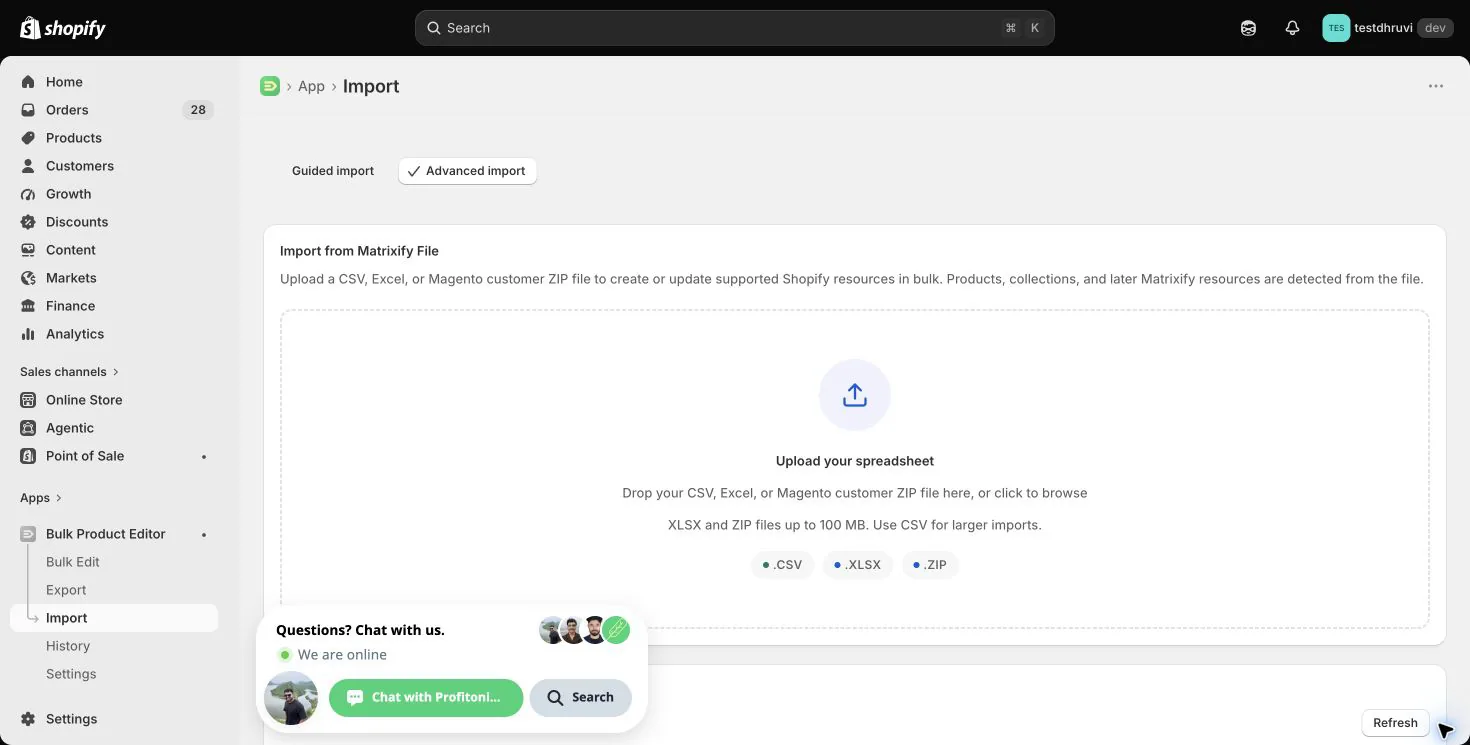
Start with one representative product and inspect Shopify afterwards. Verify the intended fields, every affected variant, inventory location, media association, and catalog price. Download the result file and inspect warnings as well as failures. Keep it beside your untouched export; rerun only rows whose outcome and repeat behavior you have checked.
Related tutorials
- Products export and import round trip — prepare a focused export, preserve identity, and verify the result.
- Update inventory across multiple locations — use exact location headers and quantities.
- Add multiple images per product — append media without replacing the gallery.
- Shopify Metafields export and import — understand typed values and owner references.
About EditEngine: EditEngine Bulk Product Editor helps Shopify merchants bulk edit, import, and export store data from spreadsheets.