
Variants & options
How to Bulk Edit Weight Unit
Published by Profitonium Apps · Last updated
Switch the unit your variant weights are stored in — kilograms, grams, pounds, or ounces — across many products at once. Useful when you've imported products from a supplier in the wrong unit, when you're standardising a catalog after a merge, or when Shopify's Markets / shipping setup expects a specific unit.
Weight Unit is a variant field. Each product variant carries its own unit, so EditEngine runs the change once per matched variant. A product with three variants gets three updates.
Changing the unit does not convert the value. This is the single most important thing to understand. If a variant currently reads
2 lband you switch the unit to kilograms, the variant becomes2 kg— not0.91 kg. Use this to fix mislabelled units, not to convert weights. To do a real conversion, edit the Weight (in product's unit) field separately with the converted value.
Step 1: Pick the Weight Unit field
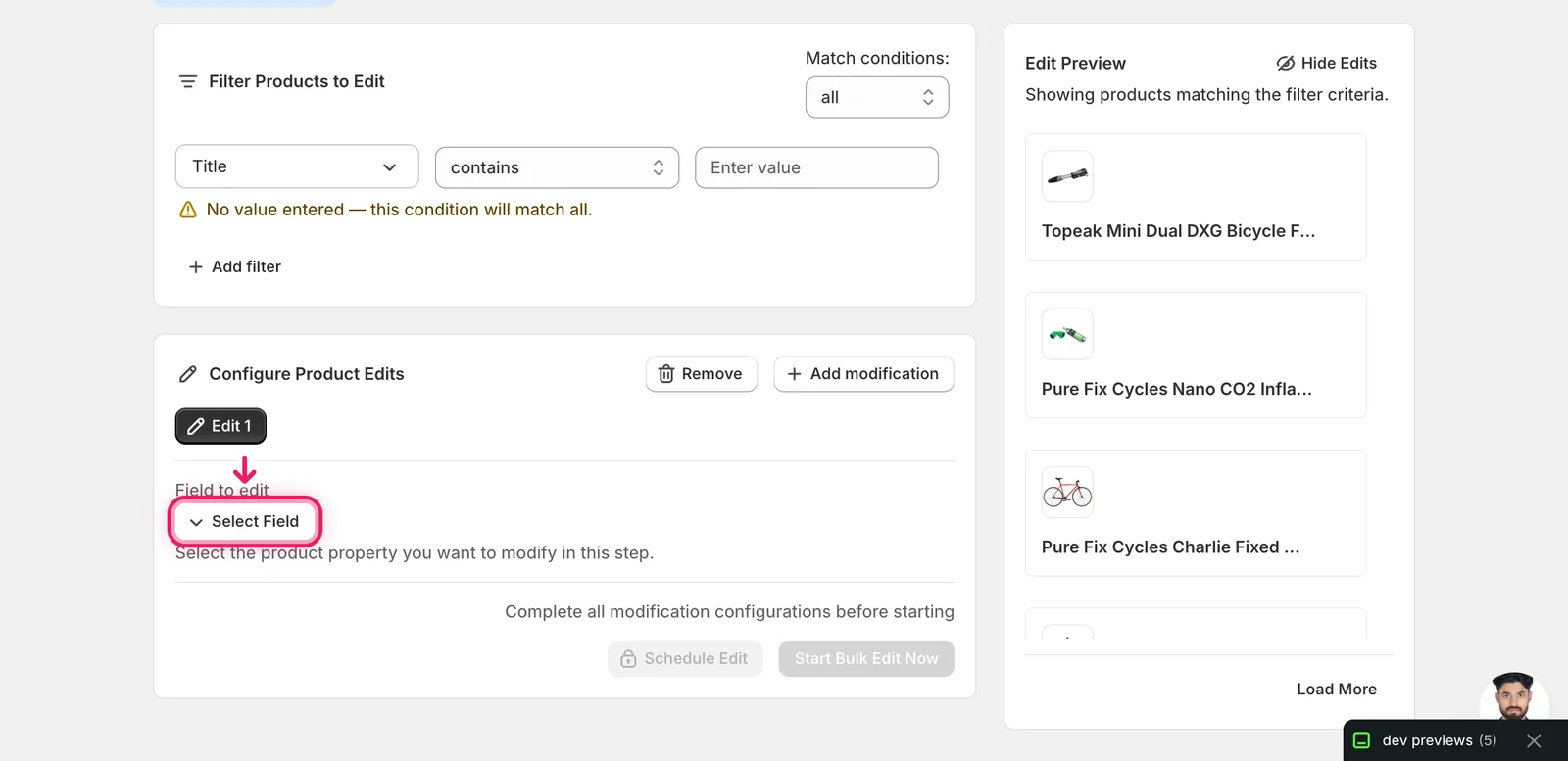
In the Configure Product Edits panel, click Select Field.
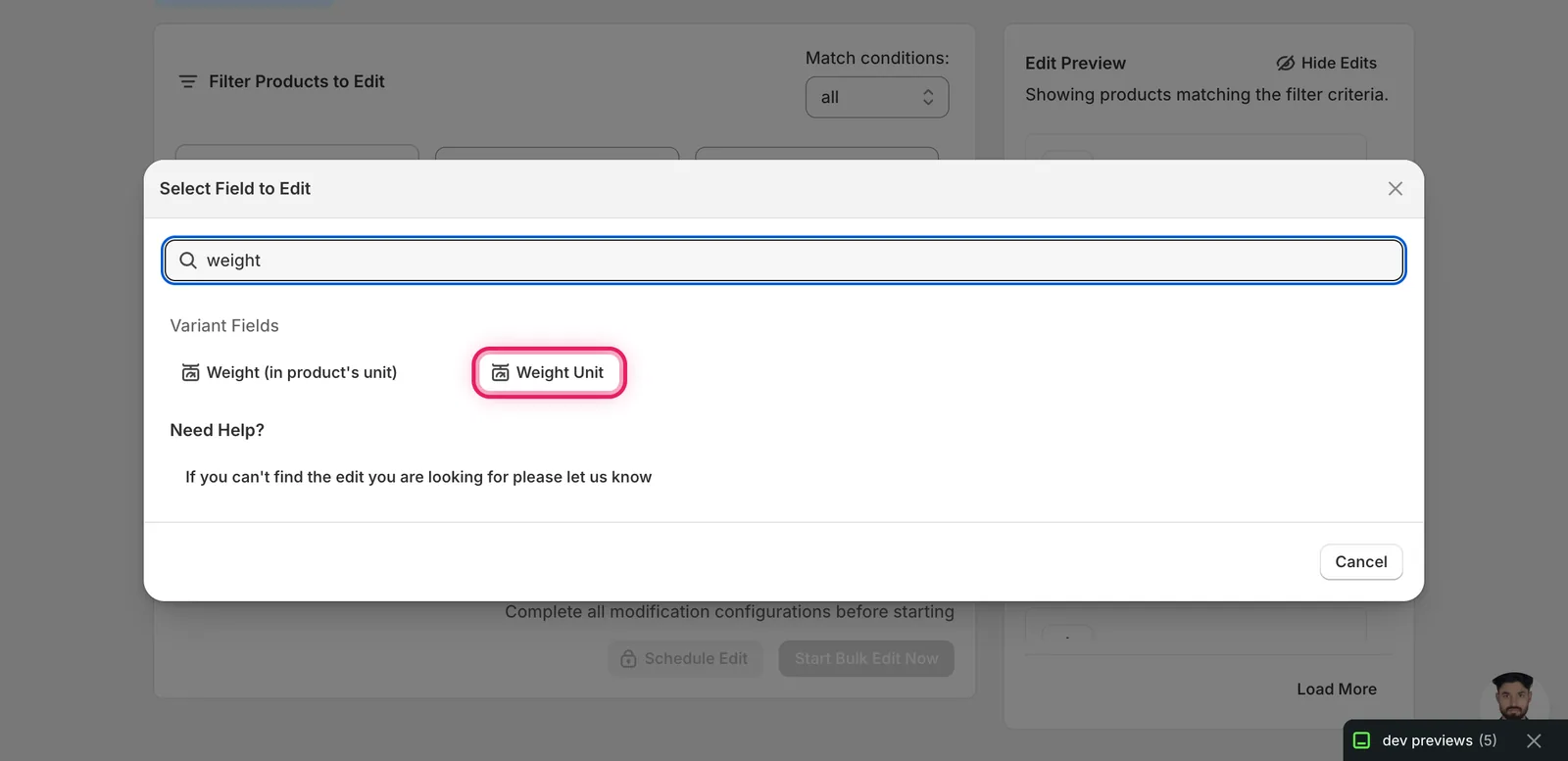
Weight Unit lives under Variant Fields. Type weight in the search to filter the list and you'll see two entries — pick Weight Unit (the second one). The first, Weight (in product's unit), edits the numeric weight, not the unit.
Click it. The configuration panel switches to a Weight Unit form with a single Variant Weight Unit dropdown. The Edit Preview on the right immediately shows what would happen with the default selection — for variants currently in pounds, you'll see POUNDS struck through and the new unit beside it.
Step 2: Pick the unit
The form has one action — set the unit to a value — and one input. The dropdown offers five options, of which two map to kilograms:
- Store default (kg) — kilograms, regardless of what your store's default is set to
- Pounds (lb)
- Ounces (oz)
- Kilograms (kg) — same as Store default
- Grams (g)
Pick the unit you want every matched variant to use. The Edit Preview on the right updates per variant, with the original unit struck through and the new unit shown in green. Variants already in the chosen unit are skipped from the preview because nothing would change for them.
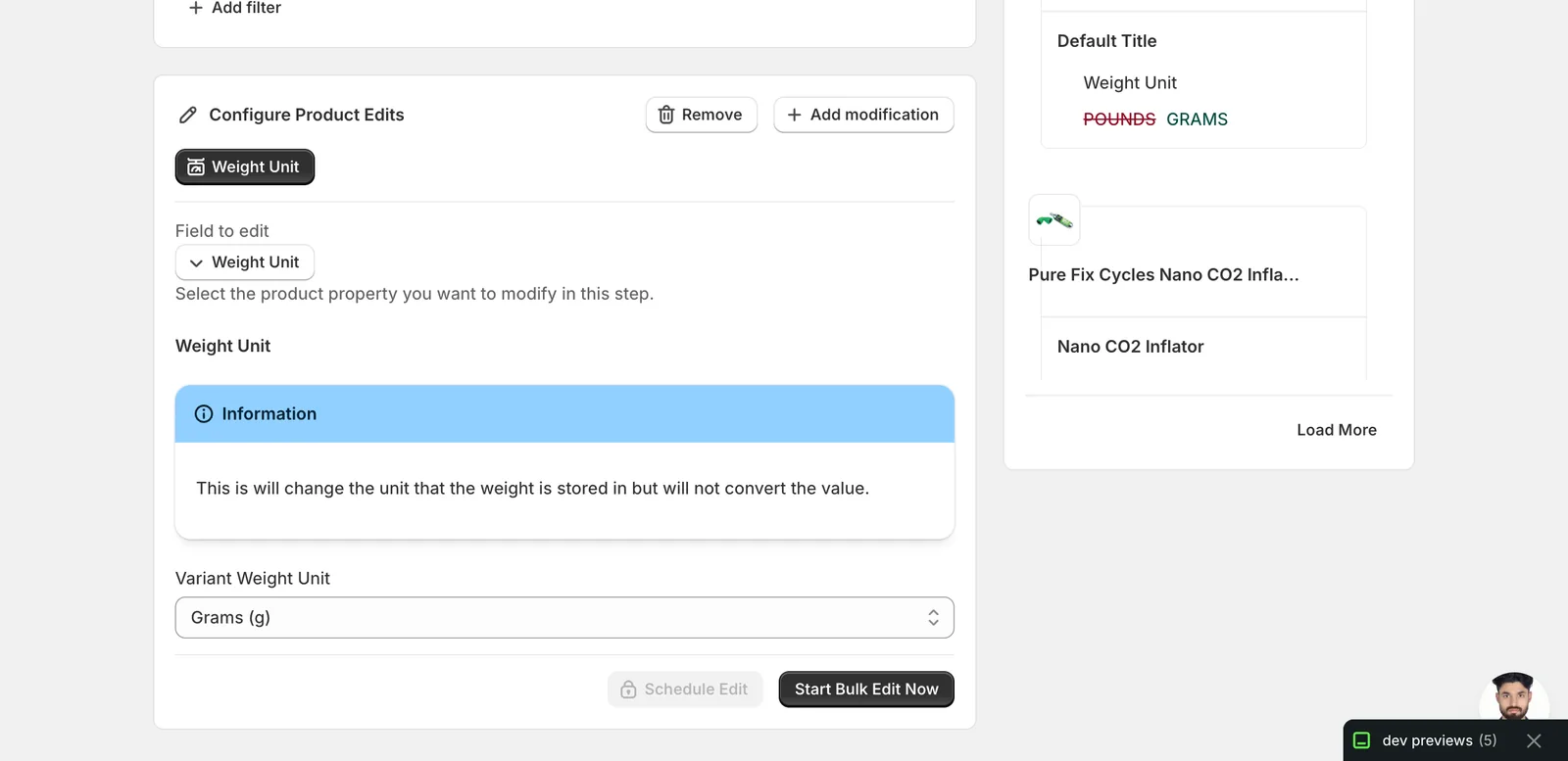
The blue Information banner inside the form repeats the warning: the value isn't converted. It's there because this is the most common foot-gun for the field.
When you're satisfied with the preview, click Start Bulk Edit Now to run, or Schedule Edit to queue it for later.
After the run
- Weight Unit changes are reversible from the History page using Undo.
- The numeric weight value is not touched. A
2 lbvariant becomes2 kg(or2 g, or2 oz) — the number stays put. If your goal is real unit conversion, run a separate edit on the Weight (in product's unit) field with the converted number. - Variants already in the target unit are no-ops — the bulk editor skips them silently rather than rewriting the same value.
- Variants with
requiresShipping = false(digital products, services) carry a unit too, but it doesn't affect the storefront. The field updates regardless. - Shopify uses the variant's weight unit for shipping calculations and Markets feeds. Mismatched units between variants of the same product can cause confusing rate quotes — pick one unit and stick with it across the catalog.
Frequently asked questions
How do I bulk change the weight unit on Shopify variants to kilograms or grams?
Pick Weight Unit under Variant Fields in EditEngine — type weight in the search and choose the second entry, not Weight (in product's unit). A single dropdown offers Store default (kg), Pounds, Ounces, Kilograms, and Grams. Pick one and every matched variant switches to that unit, one update per variant.
Does switching the weight unit in Shopify convert the weight value?
No — this is the most important thing to understand. A variant reading 2 lb becomes 2 kg, not 0.91 kg, and an Information banner in EditEngine's form repeats the warning. Use this edit to fix mislabelled units; for a real conversion, edit the Weight (in product's unit) field separately with the converted value.
Can I undo a bulk weight unit change in Shopify?
Yes. Weight Unit changes are reversible from EditEngine's History page using Undo. Before running, the Edit Preview shows each variant's original unit struck through with the new unit beside it, so you can confirm the change per variant before clicking Start Bulk Edit Now or Schedule Edit.
What happens to Shopify variants already stored in the weight unit I pick?
They are no-ops — EditEngine skips them silently rather than rewriting the same value, and they drop out of the Edit Preview because nothing would change for them. Variants with requiresShipping set to false, like digital products and services, carry a unit too and update regardless, though it does not affect the storefront.
Why do mismatched weight units matter for Shopify shipping rates?
Shopify uses the variant's weight unit for shipping calculations and Markets feeds, so mismatched units between variants of the same product can cause confusing rate quotes. EditEngine lets you standardise the whole catalog in one run — pick one unit and stick with it, especially after importing supplier data in the wrong unit.