
Orders and fulfillment
Shopify Draft Orders: Column Reference
Published by Profitonium Apps · Last updated
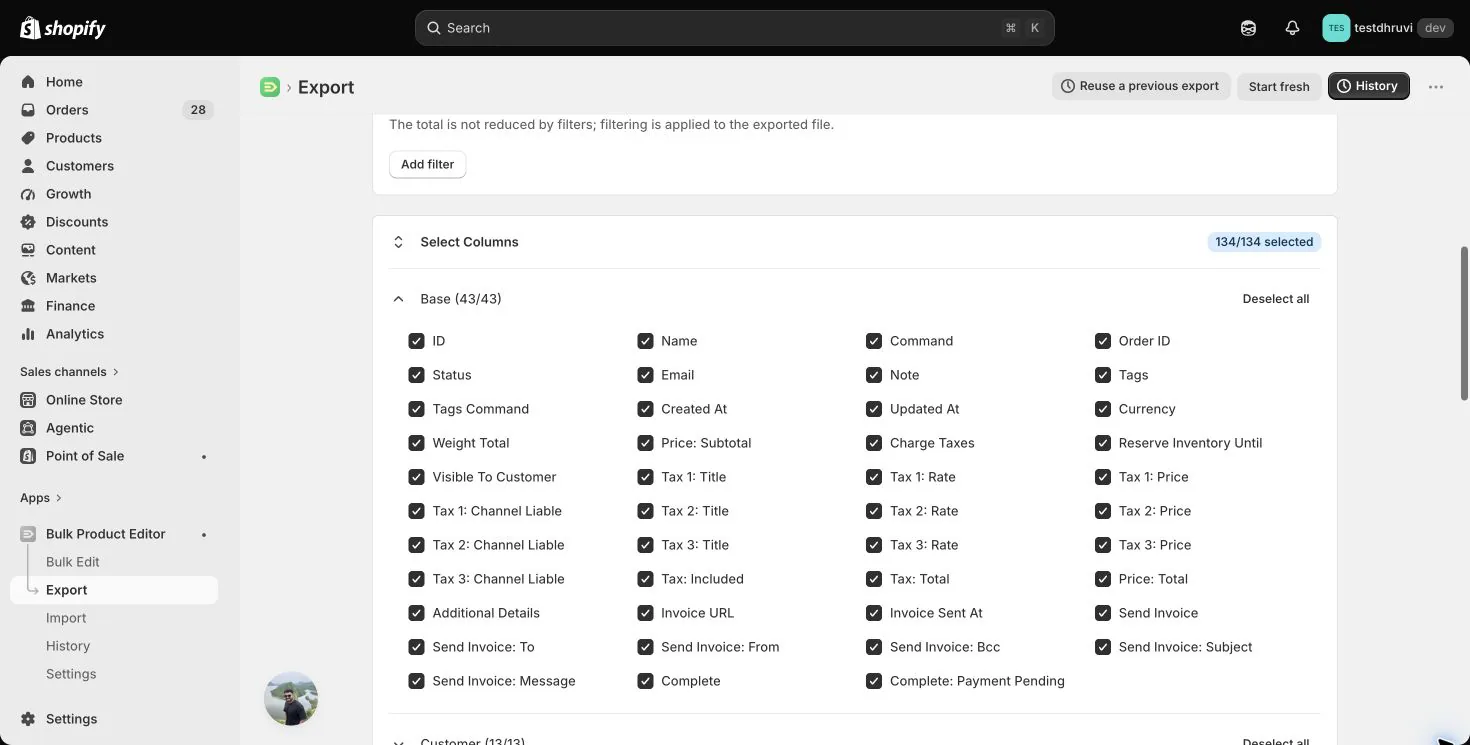
This reference covers all 134 Draft Orders export controls in EditEngine, including which values you can change through Advanced Import. Draft Orders import is publicly available, subject to the required Shopify access. Changes to fields and lines apply to open or invoice-sent drafts. A completed draft accepts only a tags-only UPDATE or MERGE.
Export a small Draft Orders selection from EditEngine → Export, keep an untouched copy, and remove columns unrelated to your change before importing. Use a CSV or an Excel worksheet named Draft Orders or Draft Order. In Import → Advanced Import, review the detected resource, headers, commands, and row count. Test one open draft and verify the result in Shopify before using a larger file. Advanced Import does not have the bulk editor's one-click undo.
How to read this reference
Create/update means EditEngine uses the supplied value for a new draft or a supported update to an open or invoice-sent draft. Export only means editing that cell does not change Shopify through this sheet. New customer only means it is used only when the import creates a customer; it never updates the profile of an existing customer.
| Export group | Controls |
|---|---|
| Base | 43 |
| Customer | 13 |
| Billing and Shipping Addresses | 26 |
| Company | 6 |
| Line Items | 38 |
| Line Items Product Data | 7 |
| Metafields | 1 |
| Total | 134 |
There are 133 fixed headers plus one dynamic Metafields control. Metafields can expand into several namespace/key headers, so the spreadsheet's final column count can differ from 134. Numbered tax patterns below expand separately for 1, 2, and 3.
Blank ordinary fields normally leave the corresponding update input unset. Blank tags do nothing. Blank selected metafield cells delete the metafield. Line replacement, line quantities, and prices have their own defaults; review those sections before reimporting an export.
Base columns: identity and editable fields
| Exact header | Value or example | Advanced Import treatment |
|---|---|---|
ID | Draft Order ID, such as 1234567890 | Primary lookup and grouping identity. Numeric IDs or Shopify Draft Order GIDs are accepted. A supplied but unresolved ID prevents MERGE/UPDATE from falling back to Name. Remove source-store IDs for migration. |
Name | Shopify-generated name, such as #D100 | Exact lookup only when ID is absent; also groups rows when ID and Number are absent. Does not rename a Shopify draft or choose its generated name. |
Command | NEW, MERGE, UPDATE, REPLACE, DELETE, IGNORE | Controls the draft group. Blank defaults to MERGE; exports contain MERGE. See command behavior below. |
Order ID | ID of the Order created from the draft | Export only. Does not identify a draft or edit the resulting Order. |
Status | open, invoice_sent, completed | Export only. Sending an invoice or completing a draft changes its state through the action columns. |
Email | buyer@example.com | Create/update the draft's contact email. Separate from Customer: Email, which resolves the linked customer. Blank leaves it unset. |
Note | Deliver after Monday | Create/update the draft note. Blank does not clear an existing note. |
Tags | Wholesale, Priority | Comma-separated tags, interpreted by Tags Command. Blank creates no tag operation. |
Tags Command | MERGE, DELETE, REPLACE | Add, remove, or replace the tag set. Blank defaults to REPLACE, as in the export. Multiple tag rows run in spreadsheet order. |
Created At | Store-time-zone date and time | Export only. Does not backdate creation. |
Updated At | Store-time-zone date and time | Export only. |
Currency | Shopify currency code, such as USD, EUR, INR | Create/update the draft currency. Invalid codes fail. Required when a Shipping Line is supplied; include it with custom prices to make the intended currency explicit. Blank does not change an existing currency. |
Weight Total | Total weight in grams, such as 500 | Export only; does not set individual line weights. |
Price: Subtotal | Amount before shipping and tax | Export only. Change supported lines or discounts instead. |
Charge Taxes | TRUE or FALSE | Create/update whether the draft is tax-exempt: FALSE sets tax exemption, TRUE removes it. Blank leaves this input unset. Shopify calculates the resulting taxes. |
Reserve Inventory Until | 2026-10-01T12:00:00Z or 2026-10-01 12:00:00 +0000 | Create/update the reservation expiry. A valid ISO or Matrixify-style date with time zone is required. Blank does not clear a reservation. |
Visible To Customer | TRUE or FALSE | Create/update customer visibility. Blank leaves it unset. |
Tax: Included | TRUE or FALSE | Export only. A populated import cell produces a non-blocking warning and is ignored. |
Tax: Total | Total calculated tax amount | Export only. |
Price: Total | Draft total including shipping, discounts, and tax | Export only in EditEngine. It is not a target amount or price override. |
Additional Details | One name: value pair per line, such as PO: 1001 | Create/update draft attributes. Provide the complete intended list when changing it. Blank does not clear existing details. |
Invoice URL | Shopify invoice/checkout URL | Export only. Treat exported customer checkout links as private operational data. |
Invoice Sent At | Date and time of invoice sending | Export only. |
Draft-level tax blocks: 12 controls
Each pattern represents three exact headers. For example, Tax 1: Rate, Tax 2: Rate, and Tax 3: Rate are separate controls.
| Header pattern | Value or example | Advanced Import treatment |
|---|---|---|
Tax 1: Title through Tax 3: Title | Tax name, such as VAT | Export only. |
Tax 1: Rate through Tax 3: Rate | Fraction, such as 0.20 for 20% | Export only. |
Tax 1: Price through Tax 3: Price | Calculated tax amount | Export only. |
Tax 1: Channel Liable through Tax 3: Channel Liable | TRUE, FALSE, or blank if unknown | Export only. |
Invoice and completion actions: 8 controls
These are actions, not descriptions. Sending an invoice contacts the customer; completing a draft creates a real Shopify Order. Exports set Send Invoice, Complete, and Complete: Payment Pending to FALSE and leave invoice customization fields blank.
| Exact header | Value or example | Advanced Import treatment |
|---|---|---|
Send Invoice | TRUE or FALSE | TRUE sends an invoice after creating/updating the draft. False or blank does not send it. |
Send Invoice: To | Recipient email | Used only with Send Invoice = TRUE. Blank leaves Shopify's recipient default in place. |
Send Invoice: From | Sender email | Optional invoice sender passed to Shopify. Blank uses Shopify's default. |
Send Invoice: Bcc | Emails separated by commas or newlines | Optional blind-copy recipients. Blank supplies none. |
Send Invoice: Subject | Your wholesale quote | Optional subject. Blank uses Shopify's default. |
Send Invoice: Message | Message text | Optional custom message. Blank uses Shopify's default. |
Complete | TRUE or FALSE | TRUE converts the draft into an Order after the draft update and any invoice action. False or blank does not complete it. |
Complete: Payment Pending | TRUE or FALSE | Only used with Complete = TRUE. True requests payment pending; false requests completion without payment pending. Blank leaves Shopify's default unchanged. |
Customer columns: 13 controls
Customer lookup uses Customer: ID, then exact email, then exact phone. If no customer matches and an email or phone is provided, EditEngine creates a customer. These fields link a customer to the draft; they do not update an existing customer's profile. Use the Customers resource for that separate change.
| Exact header | Value or example | Advanced Import treatment |
|---|---|---|
Customer: ID | Destination Customer ID | Preferred customer link. Blank allows email/phone lookup. |
Customer: Email | buyer@example.com | Lookup and new-customer email. An unmatched email/phone can create a customer. |
Customer: Phone | International phone, such as +14165550100 | Lookup and new-customer phone. Also supplies the draft's Phone input unless a separate Phone header is present. Export reports the customer-profile phone, not the draft's standalone phone. |
Customer: First Name | Asha | New customer only. |
Customer: Last Name | Shah | New customer only. |
Customer: Note | Wholesale account | New customer only. |
Customer: Orders Count | Whole-number lifetime order count | Export only. |
Customer: State | Account state, such as enabled | Export only in EditEngine. Does not activate or invite the customer. |
Customer: Total Spent | Customer's total spending | Export only. |
Customer: Tags | Comma-separated list | New customer only. Does not apply Draft Order Tags Command to customer tags. |
Customer: Email Marketing Status | SUBSCRIBED, UNSUBSCRIBED, PENDING, NOT_SUBSCRIBED | New customer only. REDACTED and INVALID are rejected. Blank supplies no consent input; NOT_SUBSCRIBED leaves Shopify's new-customer default in place for email. |
Customer: SMS Marketing Status | SUBSCRIBED, UNSUBSCRIBED, PENDING, NOT_SUBSCRIBED | New customer only. REDACTED is rejected. Blank supplies no consent input. |
Customer: Tax Exempt | TRUE or FALSE | New customer only. Separate from the draft's Charge Taxes. |
Remove unnecessary customer profile and marketing columns from a focused draft update. Unsupported marketing states can fail validation even when the intended operation is only to link an existing customer.
Billing and shipping addresses: 26 controls
Each row below names two separate controls. The rules apply independently to billing and shipping. An address is sent only when its Country or Country Code is populated. Include the complete intended address; blank cells are not explicit clearing instructions, and do not assume a partial address update will preserve every omitted Shopify address field.
| Exact headers | Value or example | Advanced Import treatment |
|---|---|---|
Billing: First Name; Shipping: First Name | Asha | Create/update the corresponding address. |
Billing: Last Name; Shipping: Last Name | Shah | Create/update the corresponding address. |
Billing: Name; Shipping: Name | Asha Shah | Fallback for blank First Name or Last Name values; first word becomes first name, remaining words become last name. Separate populated name values take priority. |
Billing: Company; Shipping: Company | Example Retail | Address company text; does not establish a B2B Company relationship. |
Billing: Phone; Shipping: Phone | International phone number | Address contact phone. |
Billing: Address 1; Shipping: Address 1 | 10 Example Road | First address line. |
Billing: Address 2; Shipping: Address 2 | Suite 2 | Second address line. Blank is not an explicit delete. |
Billing: Zip; Shipping: Zip | 02110 | Postal code. Keep as text to preserve leading zeroes. |
Billing: City; Shipping: City | Boston | City name. |
Billing: Province; Shipping: Province | Massachusetts | Province/state name; ignored when the corresponding Province Code is populated. |
Billing: Province Code; Shipping: Province Code | MA | Takes priority over Province. |
Billing: Country; Shipping: Country | United States | Country name; ignored when Country Code is populated. |
Billing: Country Code; Shipping: Country Code | US | Two-letter country code; takes priority over Country. |
Company columns: 6 controls
These link an existing B2B company and company location. They do not create or rename either record. Use destination-store IDs, or exact external IDs/names. The linked customer must have the appropriate company-location contact role. Blank company fields do not unlink the current purchasing company.
| Exact header | Value or example | Advanced Import treatment |
|---|---|---|
Company: ID | Destination Company ID | Primary company identity. |
Company: Name | Example Retail | Exact company-name lookup when higher-priority identity is absent. |
Company: External ID | ERP-1001 | Company lookup by external ID, ahead of Name. |
Company: Location ID | Destination Company Location ID | Primary location identity. |
Company: Location Name | Main Warehouse | Exact location-name lookup within the resolved company. |
Company: Location External ID | ERP-1001-MAIN | Location lookup by external ID, ahead of location Name. |
Line Items: 38 controls
A draft expands into Line Item rows, followed by an optional Discount and Shipping Line. Repeat the same draft identity on every row. Top Row does not group an otherwise unidentified continuation row.
For an existing draft, all-REPLACE line rows become the complete line list. If any line uses MERGE or DELETE, EditEngine instead loads the current lines and applies the supplied operations. In that mode, a matched MERGE preserves omitted values; an unmatched MERGE appends a line. Do not mix REPLACE with MERGE/DELETE expecting REPLACE to wipe the entire list in that mixed file.
| Exact header | Value or example | Advanced Import treatment |
|---|---|---|
Row # | Export row number | Export only. Useful for restoring sort order. |
Top Row | TRUE on the draft's first row | Export only. Does not replace repeated draft identity. |
Line: Type | Line Item, Discount, Shipping Line | Chooses how other Line fields are interpreted. Blank uses Line Item parsing if there is line content. Only one Discount and one Shipping Line are supported per draft. |
Line: ID | Draft Order line ID | Match an existing line for MERGE/DELETE. Repeated IDs in replacement/new-draft line rows combine quantities when the other supplied values agree. A Shipping Line ID is descriptive, not its update selector. |
Line: Command | REPLACE, MERGE, DELETE | Applies to Line Item rows. Blank defaults to REPLACE, as in exports. MERGE/DELETE require an existing draft. DELETE of an unmatched line does nothing; removing all lines fails. |
Line: Product ID | Destination Product ID | Resolves a product-backed line, with Product Handle fallback if the product is not found. Also matches existing lines. Include Variant Title or SKU for multi-variant products. |
Line: Product Handle | linen-shirt | Product lookup; for Shipping Line rows, supplies the shipping-service handle instead. Ignored on Discount rows. |
Line: Title | Gift wrapping; percentage; Express | Custom line title, Discount type (percentage or fixed_amount), or Shipping Line title. Product-backed titles come from the product. Also matches existing lines. |
Line: Name | Display name or discount description | On Line Item rows, used as the title alias only if the Line: Title header is absent. On Discount rows, supplies the discount description. Shipping Line Name is export-only. |
Line: Variant ID | Destination Product Variant ID | Highest-priority product-variant link. Missing variants can use supplied Product ID, Handle, or SKU fallback. Also matches existing lines. |
Line: Variant Title | Blue / Medium | Exact variant selection within a resolved product. A variant title alone cannot identify a product. |
Line: SKU | SHIRT-BLUE-M | Exact SKU lookup or existing-line matching; custom-line SKU when an explicitly priced custom line is used. Does not change the product variant's SKU. |
Line: Quantity | Positive whole number, such as 2 | Line Item quantity. Blank defaults to 1 for new/replacement lines but preserves a matched MERGE line's quantity. On a Discount row, a positive decimal is the percentage or fixed amount. |
Line: Price | Unit amount, such as 19.99 | Custom-line unit price or Shipping Line price. Does not override product-backed line pricing. Blank can become 0.00 on custom or shipping creation/replacement, so always supply intended prices. Matched MERGE preserves an omitted custom price. |
Line: Discount | Total fixed line discount, such as -5.00 | For a Line Item, accepts either sign and converts the total discount to a per-item amount using quantity. Must be non-zero; 0 is rejected. Custom-line discount cannot exceed price × quantity. On a Discount row, used as a positive-magnitude fallback when Line: Quantity is blank. |
Line: Discount per Item | Discount divided by quantity | Export only. Edit Line: Discount instead. |
Line: Total | Discounted line total | Export only for Line Item and Shipping Line rows. On Discount rows, an import fallback only when Line: Quantity is blank and the Line: Discount header is absent. |
Line: Grams | Non-negative whole number, such as 250 | Weight on new/replacement custom lines; also supplied on a matched MERGE line when populated. New/replacement product-backed lines do not take a weight override from this cell. |
Line: Requires Shipping | TRUE or FALSE | Create/update custom lines. Product-backed lines use the product's behavior. Blank preserves a matched MERGE value. |
Line: Vendor | Product vendor | Export only in EditEngine. |
Line: Properties | One name: value pair per line | Custom attributes for custom or product-backed lines. Provide the complete intended list. Blank preserves properties on a matched MERGE line; replacement does not inherit them. |
Line: Gift Card | TRUE or FALSE | Export only in EditEngine. Does not turn a custom line into a gift card. |
Line: Taxable | TRUE or FALSE | Create/update custom lines. Product-backed lines use the product's tax behavior. Blank preserves a matched MERGE value. |
Line: Tax Total | Sum of this line's calculated taxes | Export only. |
Line: Fulfillable Quantity | Exported line quantity | Export only. Does not create or alter a fulfillment. |
Line: Fulfillment Service | Service handle, such as manual | Export only in EditEngine. This sheet does not assign a fulfillment service. |
Line tax blocks: the other 12 Line Items controls
| Header pattern | Value or example | Advanced Import treatment |
|---|---|---|
Line: Tax 1: Title through Line: Tax 3: Title | Tax name | Export only. |
Line: Tax 1: Rate through Line: Tax 3: Rate | Fraction, such as 0.20 | Export only. |
Line: Tax 1: Price through Line: Tax 3: Price | Calculated tax amount | Export only. |
Line: Tax 1: Channel Liable through Line: Tax 3: Channel Liable | TRUE, FALSE, or blank | Export only. |
Use the exact colon placement shown above. Shopify calculates draft taxes from the supported taxable inputs, addresses, and store configuration.
For SKU-only product linking, omit Line: Price. A populated price without Variant ID, Product ID, or Product Handle selects the custom-line path, even if a SKU is supplied. For a product-backed line, include its destination Variant ID whenever possible.
Line Items Product Data: 7 controls
These values describe the linked product or variant at export time. They can differ from the draft's stored line values. All seven are export only through a Draft Orders sheet.
| Exact header | Exported value | Advanced Import treatment |
|---|---|---|
Line: Product Type | Current product type | Export only. |
Line: Product Tags | Current comma-separated product tags | Export only. |
Line: Variant SKU | Current variant SKU | Export only; different from the draft line's Line: SKU. |
Line: Variant Barcode | Current variant barcode | Export only. |
Line: Variant Weight | Current variant weight value | Export only. |
Line: Variant Weight Unit | g, kg, oz, or lb | Export only. |
Line: Variant Inventory Qty | Current variant inventory quantity | Export only. Does not adjust inventory. |
Metafields: one dynamic control
| Header pattern | Value or example | Advanced Import treatment |
|---|---|---|
Metafield: namespace.key [type] | Metafield: custom.po [single_line_text_field] with value PO-1001 | Sets that Draft Order metafield. The value must fit its Shopify type. A blank or whitespace-only selected cell deletes it. If the type is omitted, EditEngine uses single_line_text_field. |
Remove every metafield column you do not intend to change. In a multi-row draft, the last cell for a given namespace/key wins, including a blank cell on a later line. An export puts metafield values on the top row, so blindly retaining blank continuation cells can delete them. For a metafield-only update, use one row per Draft Order ID and the exact metafield columns you want to set or delete.
Commands and additional accepted import headers
| Draft Command | Behavior |
|---|---|
NEW | Creates when there is no matching draft; fails if a match already exists. |
MERGE | Updates a match; creates on a miss unless an unresolved ID was supplied. Default when blank. |
UPDATE | Updates an existing match; fails on a miss. |
REPLACE | Validates the replacement input, then deletes a matching open/invoice-sent draft and creates a new draft. Creates on a miss. The original ID is not retained. |
DELETE | Deletes a matching open/invoice-sent draft; fails when no draft matches. |
IGNORE | Skips the row. |
Completed drafts accept only tags-only MERGE/UPDATE groups. Remove lines, customer columns, invoice/completion flags, and all unrelated editable fields from that file. REPLACE and DELETE are not available for completed drafts.
The following accepted import headers are not extra export controls:
| Import header | Purpose |
|---|---|
Number | Groups spreadsheet rows after ID and before Name. Never looks up a Shopify draft or assigns its generated number. |
Phone | Sets the draft's standalone phone when nonblank. A present Phone header takes precedence over Customer: Phone for the draft contact input, including when its cell is blank. |
Customer: Name | Full-name fallback for blank customer First Name/Last Name values when a customer is created. |
Company: Contact ID | Explicit destination company-contact reference for a B2B draft. Must belong to the correct company/location relationship. |
Preserve identity on every multi-row draft and keep its Draft Order Command consistent across those rows. An unidentified row containing draft or line data becomes a separate new-draft group; it does not join the previous row.
Differences from Matrixify to keep in mind
The official Matrixify Draft Orders reference provides the source format and column terminology. EditEngine's actual import rules above take precedence when moving a file between apps.
- EditEngine can find a draft by exact Name when ID is absent; Matrixify documents ID for existing-draft updates.
- EditEngine uses address Name to fill blank first/last-name values, even when those separate headers exist. Matrixify documents the full-name fallback when the separate columns are absent.
- Some Matrixify fields without an export-only label are read-only here, including Price: Total, Customer: State, Line: Vendor, Line: Gift Card, and Line: Fulfillment Service.
- EditEngine rejects the read-only customer marketing values REDACTED and INVALID as described above.
Related tutorials
- Export and import Shopify Draft Orders — the complete filter, export, edit, import, and verification workflow.
- Export and import Shopify Orders — changes to the real Order produced by completion have separate limits.
- Export and import Shopify customers — update existing customer profiles before linking them to drafts.